
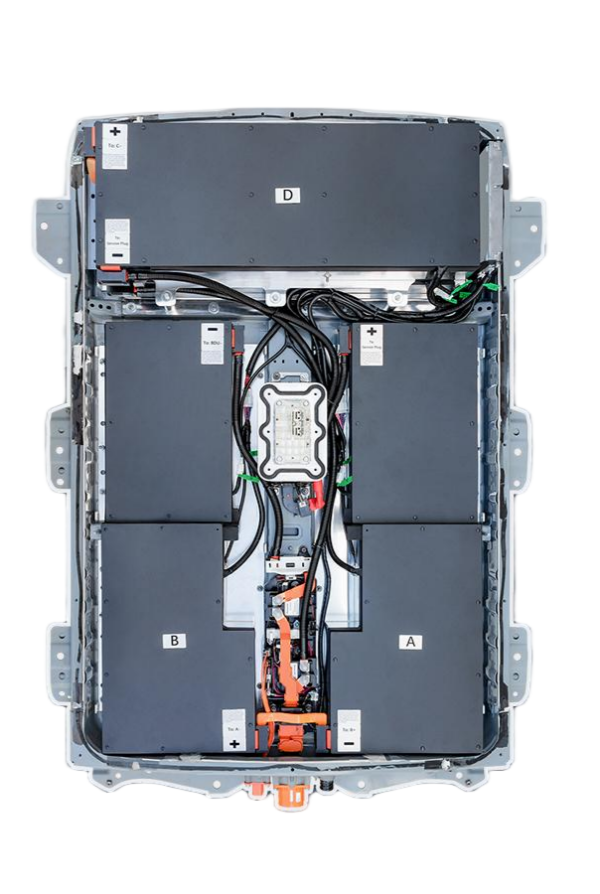
DIY New Nissan Leaf 40kWh Battery Tutorial: A Comprehensive Step-by-Step Guide
Upgrading your Nissan Leaf’s battery is a significant decision. Whether your current battery has degraded over time or you simply want to extend your vehicle’s range, replacing it with a brand-new 40kWh battery is a cost-effective solution that breathes new life into your car. At CNS BATTERY, we specialize in providing high-quality, OEM-compatible battery packs for Nissan and BMW models. In this comprehensive guide, we will walk you through the DIY process of installing a new 40kWh battery in your Nissan Leaf. This tutorial is designed to ensure a smooth, safe, and successful installation.
🛠️ Why Choose a Brand-New 40kWh Battery?
Before diving into the installation steps, it is essential to understand the benefits of upgrading to a brand-new 40kWh battery. Unlike refurbished or used batteries, a new battery offers:
- Guaranteed Performance: A new battery ensures maximum range and efficiency, providing a driving experience similar to a brand-new vehicle.
- Longevity: With proper care, a new battery can last for years, offering a reliable power source for your daily commutes.
- Safety: New batteries come with advanced Battery Management Systems (BMS) that monitor and protect the battery from overcharging, overheating, and short circuits.
- Cost-Effectiveness: Compared to the cost of a new car or an original manufacturer battery, a new 40kWh battery is a fraction of the price, saving you thousands of dollars.
At CNS BATTERY, our 40kWh lithium battery packs are built with brand-new CATL cells, ensuring top-tier performance and safety. We are committed to providing reliable battery solutions that meet OEM standards, helping you extend your range and improve safety.
📦 What’s Included in the Package?
When you order a 40kWh battery from CNS BATTERY, you will receive a complete package that includes everything you need for the installation. Our package typically includes:
- 40kWh Lithium Battery Pack: The core component of the upgrade, built with brand-new CATL cells.
- Installation Toolkit: A set of tools specifically designed for the installation process, including insulated gloves and terminal cleaner.
- Detailed Installation Manual: A step-by-step guide that walks you through the installation process, ensuring a smooth and successful upgrade.
- High-Quality Connectors: Color-coded connectors that match the steps in the installation video, making the wiring process simple and error-free.
📖 Step-by-Step Installation Guide
Installing a new battery in your Nissan Leaf is a manageable task that can be completed in a few hours. Follow these steps to ensure a successful installation:
1. Preparation
Before you begin, ensure you have a safe and clean workspace. Park your vehicle on a flat surface and engage the parking brake. Gather all the necessary tools, including a wrench, screwdriver, and the installation toolkit provided by CNS BATTERY. It is also essential to wear insulated gloves to protect yourself from electrical shocks.
2. Disconnect the Vehicle Power
The first step in the installation process is to disconnect the vehicle’s power. Locate the main fuse box and remove the main fuse to cut off the power supply. This step is crucial for your safety and prevents any electrical shorts during the installation.
3. Remove the Old Battery
Next, remove the old battery from the vehicle. Start by disconnecting the cables from the old battery, ensuring you label them for easy reconnection later. Then, remove the mounting brackets and carefully lift the old battery out of the vehicle. Be cautious when handling the old battery, as it may be heavy and contain hazardous materials.
4. Install the New Battery
Now, it is time to install the new 40kWh battery. Place the new battery in the vehicle, ensuring it is properly aligned with the mounting brackets. Connect the cables to the new battery, following the color-coded connectors provided in the installation toolkit. Ensure all connections are secure and tight to prevent any electrical issues.
5. Reconnect the Vehicle Power
Once the new battery is installed, reconnect the vehicle’s power by replacing the main fuse in the fuse box. Turn on the vehicle and check the dashboard for any error messages. If everything is functioning correctly, the installation is complete.
6. BMS Programming
The final step in the installation process is BMS programming. This step ensures the battery management system is properly configured for your vehicle. Follow the instructions in the installation manual or watch the step-by-step video tutorial provided by CNS BATTERY. If you encounter any issues during the programming process, our customer service team is available to provide remote video guidance to help you resolve the problem.
💡 Tips for a Successful Installation
To ensure a smooth and successful installation, here are a few tips to keep in mind:
- Follow the Video Tutorial: We provide high-definition tutorial videos that walk you through the installation process step by step. Watching the video before starting the installation can help you understand the process and avoid any mistakes.
- Use the Installation Toolkit: The toolkit provided by CNS BATTERY includes all the necessary tools for the installation, including insulated gloves and terminal cleaner. Using these tools ensures a safe and efficient installation.
- Seek Professional Help if Needed: While the installation process is designed to be user-friendly, if you are not comfortable performing the installation yourself, we recommend seeking the help of a certified technician. Our customer service team can also provide remote video guidance to assist you during the installation.
📞 Get Your Custom Quote Today
Upgrading your Nissan Leaf with a brand-new 40kWh battery is a cost-effective solution that extends your vehicle’s range and improves its performance. At CNS BATTERY, we are committed to providing high-quality, OEM-compatible battery solutions that meet the needs of our customers. Our batteries are built with brand-new CATL cells, ensuring superior durability, safety, and energy efficiency.
If you are ready to upgrade your vehicle, Get a Free Custom Quote today. Our team of experts is available to answer any questions you may have and help you find the perfect battery solution for your Nissan Leaf.
❓ Frequently Asked Questions (FAQ)
Q: How long does the installation take?
A: Installing a CNS battery typically takes 1-2 hours, depending on your vehicle model and experience level. For a professional technician, it may only take 50 minutes; DIY users may need additional time to prepare tools.
Q: Is an installation guide provided?
A: Yes, we offer a comprehensive installation guide, including step-by-step installation videos and a PDF download covering safety precautions. We also provide video call installation guidance for free.
Q: Are CNS batteries compatible with my Nissan Leaf model?
A: Yes, CNS Automotive Batteries are designed specifically for Nissan models, ensuring broad compatibility. We support a wide range of popular models, including the Nissan Leaf ZE0, AZE0, and ZE1. To check your specific vehicle model, simply provide our customer service team with your vehicle’s year, model number, and VIN code for instant confirmation.
Q: What is the warranty for the 40kWh battery?
A: All CNS Automotive Batteries come with a minimum 2-year/80,000KM warranty, covering manufacturing defects. Free replacement or repair will be provided if any problems occur.
Q: Can I install the battery myself?
A: Yes, the installation process is designed to be user-friendly, and we provide detailed guides and video tutorials to assist you. However, we recommend having it done by a certified technician to avoid warranty issues if you are not confident in your skills.



