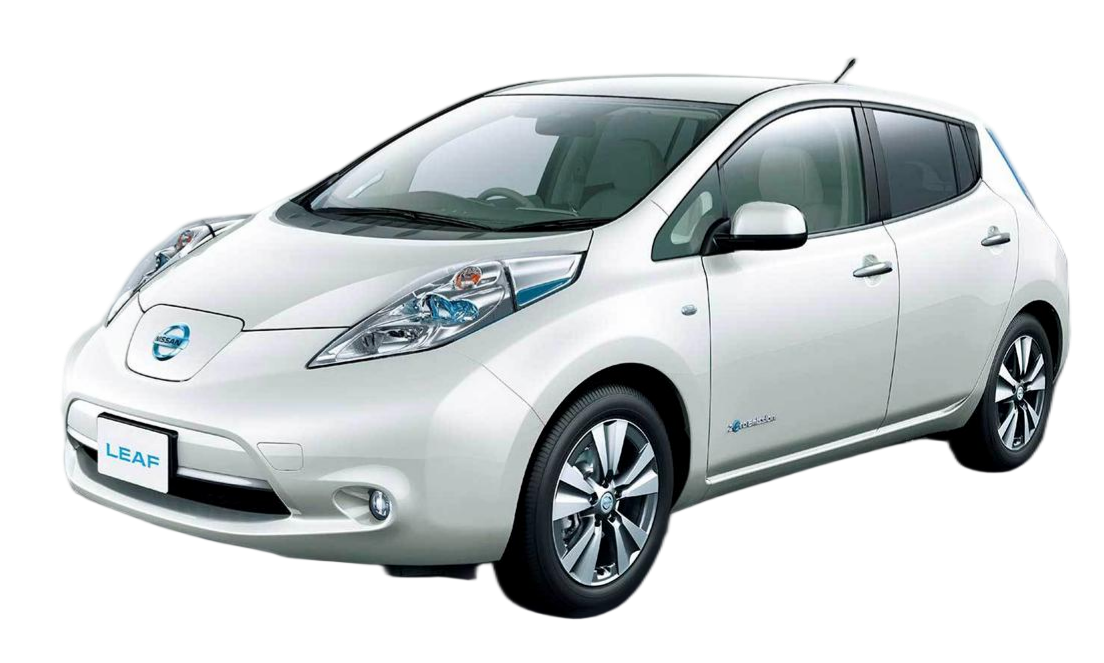
Nissan Leaf SL New Battery Replacement Tutorial
The Nissan Leaf SL is a legendary electric vehicle, but even the best cars face battery degradation over time. If your Leaf’s range has dropped significantly or the battery management system (BMS) is throwing errors, you’re likely considering a replacement. However, the official Nissan replacement can cost upwards of $16,000, which is often more than the car is worth.
At CNS BATTERY, we specialize in providing OEM-compatible, high-performance lithium-ion battery solutions for Nissan and BMW models. We understand that replacing the battery is a major decision. To help you regain confidence in your vehicle, we have created this comprehensive Nissan Leaf SL New Battery Replacement Tutorial.
This guide covers everything from pre-purchase checks to the final programming step. By the end, you will know exactly how to replace your old, degraded pack with a brand-new, high-capacity CNS battery and get your car back on the road with a full charge range.
🛠️ Pre-Installation: Preparation is Key
Before you begin the physical replacement, proper preparation ensures a smooth process and protects your investment.
1. Verify Compatibility
Not all Leaf batteries are the same. The Nissan Leaf SL has been produced in various years with different battery chemistries (Lizard or AZE0/ZE1).
- Check your VIN: Before purchasing, upload your Vehicle Identification Number (VIN) to our compatibility checker. This ensures you get the correct voltage and connector type.
- Select the Right Capacity: CNS offers upgrades. While the standard might be 40kWh, you can often upgrade to a 62kWh battery for a significantly longer range. Ensure your car’s software supports the upgrade.
2. Gather Your Tools
This is not a simple tire change; it requires specific equipment. For a Nissan Leaf SL battery replacement, you will need:
- Hydraulic Floor Jack & Jack Stands: The battery pack weighs approximately 300kg (660lbs). You need a heavy-duty jack to lift the car and stands for safety.
- Socket Set: Standard metric sockets (8mm, 10mm, 12mm, 14mm, 17mm).
- Insulated Gloves: Safety first! Always disconnect the 12V battery before starting any high-voltage work.
- Torque Wrench: To ensure bolts are tightened to the manufacturer’s specifications.
- Diagnostic Tool: You will need an OBD2 scanner capable of resetting the BMS after installation.
3. Safety Protocol
- Disconnect the 12V Battery: Always start by removing the negative terminal of the 12V auxiliary battery. This cuts power to the BMS and prevents short circuits.
- Work in a Clean, Dry Area: Avoid moisture and debris that could damage the new battery contacts.
🔋 Step-by-Step Replacement Guide
Follow these steps carefully to remove the old battery and install your new CNS pack.
Step 1: Lift the Vehicle
Using your hydraulic jack, lift the Nissan Leaf SL from the designated jacking points. Place jack stands under the subframe for maximum safety. Never work under a car supported only by a jack.
Step 2: Remove the Undertray
The Leaf’s battery is protected by a plastic undertray.
- Remove the plastic rivets and screws securing the tray.
- Carefully lower the tray to expose the high-voltage connectors and battery mounting bolts.
Step 3: Disconnect the High Voltage
Locate the high-voltage service disconnect (usually a bright orange connector or a large bolt).
- Disconnect the Main HV Connector: This physically breaks the circuit between the battery and the motor.
- Disconnect the Charging Port Harness: Unplug the connector leading to the charging port.
Step 4: Disconnect the Low Voltage & Sensors
- BMS Connector: Unplug the communication harness from the old battery to the car’s computer.
- Thermal Sensors: Carefully unclip any temperature sensors attached to the battery casing.
Step 5: Remove the Old Battery
- Loosen Mounting Bolts: There are typically 4-6 large bolts securing the battery to the chassis. Remove these.
- Lower the Pack: Using the jack, slowly lower the old battery pack out from underneath the vehicle. Be mindful of the tight clearance.
Step 6: Install the New CNS Battery
Now, install your brand-new CNS BATTERY.
- Positioning: Slide the new CNS battery into place. Our packs are designed to OEM standards, ensuring a perfect fit.
- Reconnect HV: Reconnect the main high-voltage bolt and the charging port harness. Tighten to Nissan specifications (usually 15-20 Nm).
- Reconnect LV: Plug in the BMS communication cable and reattach the thermal sensors.
- Secure Mounting: Tighten all chassis mounting bolts securely.
Step 7: Reinstall Undertray and Lower Car
- Replace the plastic undertray and secure all rivets.
- Remove the jack stands and lower the vehicle to the ground.
💻 Final Step: Programming and Testing
Installing the hardware is only half the job. The car needs to recognize the new battery.
BMS Reprogramming
Your Nissan Leaf SL uses a Battery Management System (BMS) that communicates with the car’s Engine Control Unit (ECU). Since you are installing a new pack, the ECU might still think it is connected to the old, degraded battery.
- Connect the 12V: Reconnect the negative terminal of the 12V battery.
- Diagnostic Session: Use a professional OBD2 scanner (such as Nissan Consult or a compatible aftermarket tool).
- Reset Parameters: You must reset the BMS parameters to “Factory New.” This involves clearing the old battery’s learned capacity data and allowing the system to recalibrate with the 100% capacity of your CNS battery.
Expert Tip: If you are not comfortable performing the BMS programming yourself, CNS BATTERY offers remote video guidance. Our technical experts can walk you through the software setup via Zoom or Line to ensure a perfect match.
🏆 Why Choose a CNS Battery for Your Leaf SL?
When replacing the heart of your Nissan Leaf, quality and warranty are paramount. Here is why our customers choose CNS:
- Brand New CATL Cells: Unlike refurbished or second-hand batteries that use degraded cells, CNS uses brand-new, A-grade lithium-ion cells from CATL (Contemporary Amperex Technology Co. Limited), the world’s largest battery manufacturer.
- Significant Cost Savings: You save over 50% compared to the official Nissan replacement cost.
- Extended Warranty: We offer an industry-leading 2-Year / 80,000 KM warranty, far surpassing the coverage offered by most used battery sellers.
- Performance: Expect a full charge range of up to 430km with our upgraded packs, effectively reviving your vehicle.
❓ Frequently Asked Questions (FAQ)
Q1: Is it difficult to install a CNS battery by myself?
A: The physical installation is considered moderate in difficulty. If you are mechanically inclined and have access to a hydraulic jack, it typically takes 1-2 hours. However, the BMS programming step requires specific diagnostic tools. If you are unsure about the electronics, we recommend hiring a mechanic or utilizing our remote video support service.
Q2: Will a CNS battery void my Nissan Leaf’s warranty?
A: Generally, replacing the battery with an aftermarket part does not void the entire vehicle warranty. However, it may affect the powertrain warranty specifically related to the battery. Our batteries are designed to OEM standards to minimize compatibility issues. We recommend checking your specific vehicle warranty terms.
Q3: How do I know if my Leaf SL model is compatible with a CNS battery?
A: CNS batteries are compatible with Leaf ZE0, AZE0, and ZE1 models. To be 100% certain, please provide your VIN number to our technical team for a free compatibility check.
Q4: What is the lifespan of a new CNS battery?
A: Our batteries use new CATL cells with a cycle life of over 3000 cycles. With proper maintenance, you can expect 8-10 years of reliable service, maintaining over 70% capacity throughout the warranty period.
Q5: How long does shipping take?
A: We ship globally. Standard sea freight typically takes 4-8 weeks, while expedited air freight is available for urgent needs (usually 5-10 business days).
Ready to Revive Your Nissan Leaf SL?
Don’t let a dead battery end your electric journey. With this Nissan Leaf SL New Battery Replacement Tutorial, you have the knowledge to install a high-performance, cost-effective solution.
Contact CNS BATTERY today for a free compatibility assessment and quote. Let our experts help you get back on the road with confidence.