
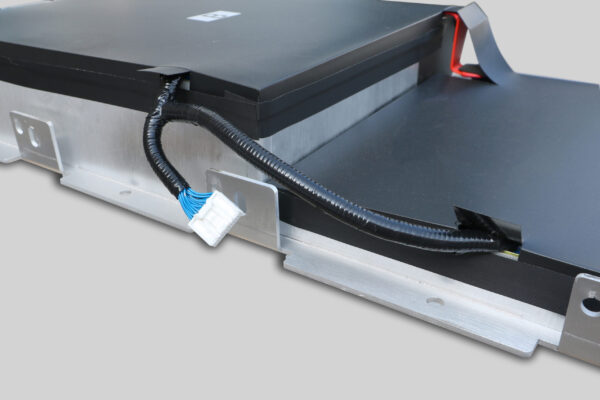
How to Replace Your Leaf ZE0 Battery: A Complete Guide
If you own a Nissan Leaf ZE0 (specifically the 2011-2013 models), you are likely facing a common dilemma: the original 24 kWh battery has significantly degraded, leaving you with a fraction of the original range. You might be wondering if it’s time to buy a new car, but there is a smarter, more economical solution.
At CNS BATTERY, we specialize in breathing new life into older EVs. Replacing your ZE0 battery isn’t just about maintenance; it’s about upgrading to modern lithium-ion technology. This guide will walk you through the entire process, from choosing the right replacement to installation and aftercare.
Why Replace Your Leaf ZE0 Battery?
The Nissan Leaf ZE0 was a pioneer in the electric vehicle market. However, the early generation batteries were prone to capacity loss, especially in hot climates or after heavy use.
The good news is that the ZE0 chassis is incredibly robust. By replacing the old, degraded battery with a modern, high-capacity lithium-ion pack, you can transform your car.
- Cost Efficiency: Replacing the battery costs significantly less than buying a new Nissan Leaf.
- Extended Range: You can upgrade from the original 24 kWh to modern capacities like 40 kWh, 50 kWh, or even 62 kWh.
- Environmental Impact: Upcycling your existing car reduces waste and the carbon footprint associated with manufacturing a new vehicle.
Choosing the Right Replacement Battery
Not all replacement batteries are created equal. When searching for a “Leaf ZE0 battery replacement,” you will encounter three main options: refurbished OEM packs, used batteries, and new aftermarket packs.
CNS BATTERY recommends new aftermarket packs for the ZE0 conversion. Here is why:
- New Cells: We utilize brand-new, high-quality CATL (Contemporary Amperex Technology Co. Limited) battery cells. Unlike refurbished packs that reuse old, worn-out cells, new cells guarantee maximum cycle life and safety.
- OEM Compatibility: Our packs are engineered to fit the ZE0 chassis perfectly. They are plug-and-play compatible with the original Battery Management System (BMS) and vehicle connectors.
- Performance: New cells offer superior thermal management and power density compared to the decade-old technology in the original ZE0 pack.
Step-by-Step Replacement Guide
Replacing the battery in your Leaf ZE0 is a significant mechanical task, but it is achievable with the right tools and preparation. Here is a breakdown of the process.
1. Preparation and Safety
Before you begin, ensure you have a safe workspace. You will need:
- A hydraulic jack and jack stands (or a car lift).
- Socket sets and wrenches.
- Insulated gloves and safety glasses.
- A torque wrench for reassembly.
Critical Safety Note: Always disconnect the 12V auxiliary battery first to cut power to the vehicle’s systems before touching the high-voltage components.
2. Removing the Old Battery
The ZE0 battery is located under the floor of the vehicle.
- Lift the Car: Safely lift the vehicle to access the undercarriage.
- Remove Undertray: Detach the plastic or metal undertray to expose the battery casing.
- Disconnect Cables: Carefully disconnect the high-voltage (HV) cables and the low-voltage communication cables. Take photos during this step to remember the wiring layout.
- Remove Mounting Bolts: There are several mounting bolts securing the battery to the chassis. Remove these to lower the pack.
3. Installing the New CNS Battery
This is where the transformation happens.
- Positioning: Carefully position the new CNS battery pack into the chassis cavity.
- Reconnect Cables: Reconnect the HV and communication cables. Ensure the connectors are fully seated and locked.
- Secure Mounting: Torque the mounting bolts to the manufacturer’s specifications to ensure a secure fit.
- Reinstall Undertray: Put the protective undertray back in place.
4. System Activation and Programming
This is the most crucial step. The Leaf ZE0 expects a specific battery configuration.
- BMS Configuration: The CNS battery comes with a programmable BMS. You may need to work with a technician to configure the BMS to communicate correctly with the Leaf’s Vehicle Control Module (VCM).
- First Charge: Once installed, perform a full charge cycle. The car should recognize the new battery capacity.
Maintenance and Aftercare
After installing your new battery, proper maintenance is key to maximizing its lifespan.
Winter Charging Optimization:
If you live in a cold climate, avoid charging the battery immediately after driving when it is cold. Allow the battery to reach room temperature, or use a slow charge to warm it up gradually. This prevents lithium plating, which can damage new cells.
Regular Health Checks:
Use an OBD2 scanner to monitor the State of Health (SOH) and individual cell voltages periodically. A healthy pack should have balanced voltages across all modules.
Frequently Asked Questions (FAQ)
Q1: Can I really upgrade my ZE0 from 24kWh to 40kWh or 62kWh?
Yes, absolutely. The physical dimensions of modern lithium-ion modules allow us to fit higher-capacity packs into the ZE0 chassis. However, upgrading to 62 kWh may require minor modifications to the battery tray or cooling system, depending on the specific configuration. We recommend consulting our technical team for a precise compatibility check based on your VIN.
Q2: How long does the installation take?
For a professional mechanic, the physical installation (removing the old pack and installing the new one) typically takes 1 to 2 hours. However, if BMS programming or minor chassis modifications are required for the upgrade, you should allocate an additional hour for diagnostics and setup.
Q3: What warranty do CNS batteries offer?
We stand by the quality of our products. All CNS Automotive Batteries come with a comprehensive 2-year / 80,000 km warranty (whichever comes first). This covers defects in materials and workmanship and includes prorated coverage for performance degradation, ensuring your battery maintains at least 70% capacity during the warranty period.
Q4: Is the installation DIY-friendly?
While the physical removal and installation are mechanical tasks that a skilled DIYer can handle (as seen in our video tutorials), the BMS programming and electrical integration often require specialized knowledge. If you are not experienced with EV electronics, we strongly recommend hiring a certified technician to avoid voiding the warranty.
Ready to Revive Your Nissan Leaf ZE0?
Don’t let an old battery stop you from enjoying the open road. With a CNS replacement battery, you can restore your car’s range and reliability at a fraction of the cost of a new vehicle.
Get a Free Custom Quote Today
Visit our contact page to discuss your specific ZE0 model and get a personalized quote for your battery upgrade.


