
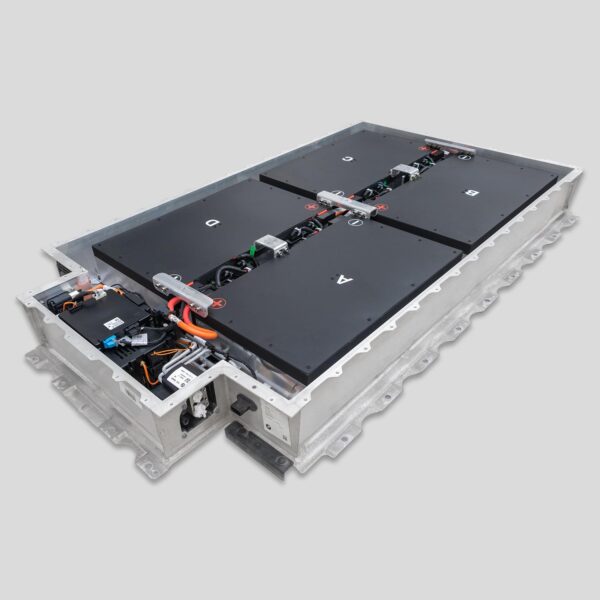
How to Program BMW i3 Battery After Replacement (Pro) – The “No-Code” Secret to 200+ Miles
You have just physically installed a brand-new, high-capacity battery into a 2016 BMW i3. The bolts are torqued, the cooling lines are connected, and the high-voltage cables are clicked into place. You reconnect the 12V auxiliary battery, turn the key, and… silence. Or worse, the dashboard lights up like a Christmas tree with “Drivetrain Malfunction” and “High Voltage System Fault.”
Panic sets in. “Did I install it wrong? Do I need to code the VIN? Do I need to flash the BMS with ISTA-P? Is this brick dead on arrival?”
For many independent shops, the fear of programming is the biggest barrier to entering the EV upgrade market. The myth persists that replacing a BMW i3 battery requires complex, dealer-level coding, VIN matching, and hours of software flashing. This myth keeps customers stuck with dying OEM batteries and sends thousands of dollars in revenue straight to the dealership.
But what if we told you that with the right upgrade solution, complex programming is a thing of the past?
Is complex coding actually required for every battery swap?
What is the difference between “coding” and “initialization”?
And how can your shop perform a professional battery replacement in under 6 hours without owning a $5,000 software license?
At CNS BATTERY, we have revolutionized the i3 upgrade experience. We know that true engineering excellence means plug-and-play compatibility. This guide demystifies the post-replacement process, explains the minimal steps required for our specific upgrades, and reveals how you can become the go-to EV specialist in your region by offering seamless, code-free installations.
The Myth vs. Reality: Coding vs. Initialization
To understand the process, we must first distinguish between two very different procedures often confused by technicians.
The Myth: “Complex Coding”
This involves changing the vehicle’s VO (Vehicle Order), flashing the BMS firmware, and manually inputting serial numbers.
- Reality: This is only required when installing a used OEM battery of a different capacity (e.g., putting a 94Ah pack into a 60Ah car) or a genuine BMW remanufactured unit that hasn’t been pre-configured. It requires expensive software (ISTA-P) and deep technical knowledge. One mistake can brick the car.
The Reality: “Simple Initialization”
This is a handshake procedure where the car recognizes a new, healthy power source.
- Reality: With CNS BATTERY upgrades, the internal BMS is pre-configured to communicate natively with the BMW chassis. The car sees a valid, healthy battery and simply needs to reset its adaptation values. No VIN coding. No firmware flashing. No complex adaptations.
The Professional “No-Code” Installation Protocol
Here is the step-by-step workflow for installing a CNS BATTERY upgrade. Notice the absence of laptops and coding suites.
Phase 1: Physical Installation & Safety Check
- Verify Connections: Ensure all HV orange connectors are fully seated (listen for the secondary lock click). Check low-voltage communication plugs.
- Cooling System: Verify the cooling loop is vacuum-filled and bled of air. Air pockets can cause immediate thermal faults.
- 12V Reconnect: Reconnect the negative terminal of the 12V auxiliary battery.
Phase 2: The Wake-Up Sequence
- Turn Ignition On: Press the start button without pressing the brake pedal. Wait 30 seconds.
- Listen for Contactors: You should hear a distinct CLUNK-CLUNK from the rear. This is the sound of the main high-voltage contactors closing. If you hear this, the physical installation is successful, and the BMS is communicating.
- Ready Mode: Press the brake and start button. The “READY” light should illuminate. If the car goes into “Ready” mode, you are 90% done.
Phase 3: The Minimal Reset (If Needed)
In rare cases, the car may hold old fault codes from the previous dead battery.
- Tool Required: Any standard OBDII scanner (even a basic $100 unit works; professional tools like Autel or Launch are better).
- Action: Navigate to “Read Codes” and then “Clear All Fault Codes.”
- Result: Because the new battery is physically healthy (perfect voltage, no insulation leaks), the codes will not return. The BMS automatically detects the new State of Charge (SOC) and begins balancing.
- Note: You do not need to register the battery serial number or change the Ah rating in the software. Our BMS reports the correct capacity automatically.
Phase 4: The Verification Drive
- Drive Cycle: Take the car for a 15-minute drive including acceleration and regenerative braking.
- Monitor Live Data: Use your scanner to watch the cell voltages. They should be tightly grouped (deviation <0.05V).
- Range Check: The dashboard range estimate may take 1-2 full charge cycles to fully calibrate to the new capacity, but the car is drivable immediately.
Why CNS BATTERY Eliminates the Programming Headache
Our engineers designed our BMW i3 Series Battery upgrades specifically for the independent shop market. We understood that requiring dealer-level software was a bottleneck.
Key Advantages for Your Shop:
- Zero Software Investment: You don’t need ISTA, ENET, or expensive subscriptions.
- Speed: Eliminate 2-3 hours of coding time. Total job time drops to 4-6 hours.
- Reduced Liability: No risk of “bricking” the car due to a failed software flash or power outage during coding.
- Universal Compatibility: Our packs work across 2014-2021 models without needing model-specific configuration files.
The Profit Pivot: From Fear to Revenue
By mastering this simple “install and clear” process, you unlock a massive revenue stream.
- The Dealer Model: Charges $20,000+ and takes 3 days (including software logistics).
- Your Shop Model: Charges $8,000 – $14,000, completes the job in one day, and keeps the customer happy with double the range (130–200+ miles).
You aren’t just selling a battery; you are selling a hassle-free experience that the dealership cannot match.
Real Story: From “Coding Fear” to “Same-Day Hero”
“Metro Auto Tech” in Chicago had turned away three i3 customers in one month because they didn’t have the latest BMW coding software. “We thought we needed a laptop to make it work,” says the owner.
After partnering with CNS BATTERY, everything changed. “Last week, we installed a 150 Ah upgrade. We bolted it in, cleared the codes with our basic Autel scanner, and drove it out. The whole job took 5 hours. The customer was amazed we could do it faster and cheaper than the dealer. We didn’t touch a coding cable once. That one job paid for our new lift.”
Stop Fearing the Laptop, Start Installing Batteries
Programming a BMW i3 battery doesn’t have to be a nightmare. With the right hardware, it’s as simple as swapping a transmission.
Don’t let the fear of software stop you from capturing the booming EV repair market. Equip your shop with CNS BATTERY upgrades and start offering same-day, code-free solutions today.
Ready to simplify your EV repairs?
Contact CNS BATTERY today to become a certified partner. Get access to our installation guides, video tutorials, and wholesale pricing. Start turning battery replacements into your most profitable, stress-free service.
👉 Become a Certified Partner & Start Installing Today
Frequently Asked Questions (FAQ) for Shops
1. Do I need to code the VIN after installing a CNS BATTERY upgrade?
No. Our batteries are engineered with a universal BMS that communicates natively with the BMW i3. The vehicle recognizes the new pack automatically without VIN coding or VO changes.
2. What tools do I need for the installation?
You only need standard mechanical tools (lift, torque wrench, transmission jack) and a basic OBDII scanner to clear any historical fault codes. Expensive dealer software (ISTA) is not required.
3. Will the range display show the correct mileage immediately?
The car will drive perfectly immediately. However, the dashboard range estimator may take 1-2 full charge cycles to learn the new capacity and display the accurate 130-200+ mile range. This is normal behavior for any battery swap.
4. What if the car throws a fault code after installation?
If a code appears, simply clear it with your scanner. If the code returns immediately, check your physical connections (HV plugs, 12V, cooling). With CNS BATTERY units, persistent codes due to “mismatched capacity” do not happen because our BMS handles the data correctly.
5. Can I install this if I don’t have EV certification?
While formal EV training is always recommended for safety when working with high voltage, the software complexity is removed. The process is mechanical + basic scanning. However, always follow proper HV safety protocols (gloves, disconnecting 12V first).
6. How long does the entire process take?
From lift-up to test-drive, a professional technician can complete a CNS BATTERY upgrade in 4 to 6 hours. This includes the physical swap, coolant fill, and code clearing.
7. Does this void the car’s remaining warranty?
Independent battery upgrades do not void the warranty on other parts of the car (suspension, motor, etc.). CNS BATTERY provides its own 3–5 Year Warranty on the battery, giving your customer better coverage than an aging OEM replacement.


