
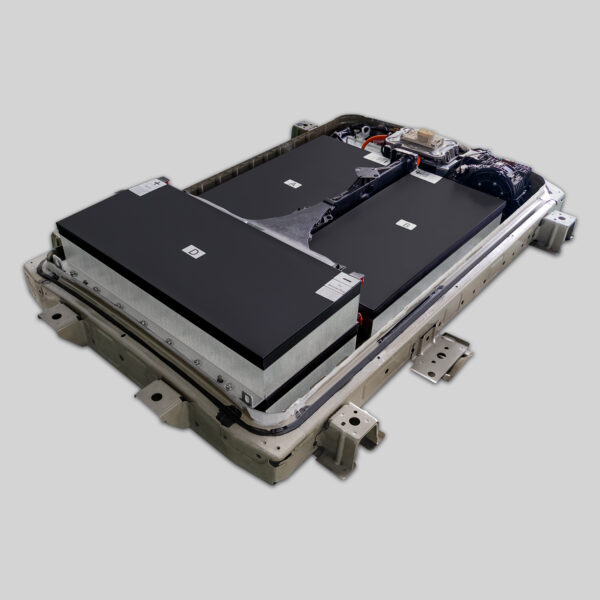
🛠️ Fixing Nissan Leaf ZE1 LeafSpy Pro Issues: A Step-by-Step Guide
If you own a Nissan Leaf ZE1 (2013-2017 model) and rely on LeafSpy Pro to monitor your battery health, you might have encountered frustrating glitches. These issues often arise when the battery’s internal software doesn’t communicate seamlessly with the third-party app, or worse, when the battery itself is degraded.
As a professional in the EV battery replacement industry, I’ve seen countless Leaf owners struggle with inaccurate State of Health (SOH) readings, missing voltage data, or the dreaded “Car Offline” error. This guide will walk you through troubleshooting these issues and explain why upgrading to a brand-new lithium battery pack is often the only permanent solution.
🤔 Why Is My LeafSpy Pro Acting Up?
Before we jump into fixes, it’s crucial to understand why this happens, specifically on the ZE1 platform.
The LeafSpy Pro app relies on the car’s internal Battery Management System (BMS) to relay data. If your battery is old or damaged, the BMS might not send clean data, causing the app to crash or display errors. Common symptoms include:
- “Car Offline” messages despite a healthy 12V battery.
- Inconsistent Voltage Readings (spiking or dropping randomly).
- Missing Data for individual modules (Cell 1-96).
- Frozen Screens when trying to view the “Battery” or “Drivetrain” tabs.
Expert Insight: Often, these errors aren’t just software bugs; they are symptoms of a dying battery. The ZE1 models are now over a decade old, and their original cells have likely degraded beyond software repair.
🛠️ Step-by-Step Troubleshooting
If you’re experiencing issues, try these steps in order. They cost nothing but your time.
1. Check Your Hardware Connection
The most common culprit is the physical connection.
- Inspect the OBD2 Port: Ensure the LeafSpy dongle is plugged in firmly. Wiggling the dongle should not cause the connection to drop.
- Check Dongle Settings: If you’re using a Bluetooth dongle (like ELM327), ensure it’s paired correctly and the battery is charged.
- Try a Different Dongle: Sometimes, the hardware simply fails. Borrow a friend’s dongle or try a different brand.
2. Update the Software
Outdated software is a frequent offender.
- Update LeafSpy Pro: Go to the Google Play Store and ensure you have the latest version.
- Update Firmware: If you have a specific dongle (like the LeafSpy Pro hardware), check the manufacturer’s website for firmware updates.
3. Reset the BMS (Battery Management System)
This is a “hard reset” for your battery brain.
- Turn the car off.
- Open the hood and disconnect the 12V negative terminal.
- Wait for 15 minutes.
- Reconnect the terminal.
- Start the car and try the app again.
🔄 The Permanent Fix: Replacing the Battery
If the steps above didn’t work, the issue is likely hardware degradation within the battery pack itself. This is where most ZE1 owners find themselves needing a replacement.
Why Refurbished Batteries Won’t Solve the Problem
Many owners try to save money by buying “used” or “refurbished” packs from salvage yards. However, these packs often carry the same communication errors and degraded cells as your old battery. You might fix the app issue temporarily, only to have the car lose power weeks later.
The solution is a brand-new, factory-built pack.
At CNS BATTERY, we specialize in Nissan Leaf ZE1 40kWh, 50kWh, and 62kWh lithium battery packs. Unlike used packs, our batteries are built with brand-new CATL cells and a state-of-the-art BMS that communicates flawlessly with diagnostic tools like LeafSpy Pro.
Benefits of a CNS New Battery:
- 100% Accurate Data: Expect clean, real-time voltage readings for every module.
- Zero Communication Errors: Our BMS is designed for compatibility, eliminating “Car Offline” errors.
- Extended Range: Jump from 80km back to 240km+ of range.
- 50% Cost Savings: We offer the quality of an OEM battery at half the price.
📈 Upgrading Your ZE1: 40kWh to 62kWh
Another common reason for LeafSpy issues is attempting to use a battery that isn’t perfectly matched to the car’s software. A popular upgrade path is moving from a 40kWh pack to a 62kWh pack.
Does this affect LeafSpy Pro?
No. In fact, a successful upgrade enhances the data you see. When you install a 62kWh lithium battery pack from CNS, the app will correctly display the higher capacity, allowing you to monitor the full health of your upgraded system.
Is it plug-and-play?
Yes, with the right provider. Our ZE1 batteries are engineered for OEM compatibility. The connectors match perfectly, and our technical team provides the necessary programming support to ensure your dashboard and apps (like LeafSpy) recognize the new battery without errors.
📝 Final Checklist Before You Buy
If you are considering a new battery to fix your LeafSpy issues, ask yourself these questions:
- Is my current battery original? If yes, it’s likely degraded beyond repair.
- Am I using a reputable brand? Generic new batteries often have BMS faults. Stick with proven manufacturers.
- What is the warranty? A lack of warranty is a red flag. You should expect at least a 2-year warranty.
Ready to fix your Nissan Leaf ZE1 for good? Don’t let software errors mask a hardware problem. Investing in a new battery pack is the only way to guarantee that your LeafSpy Pro works perfectly and that your car drives like new again.
Get a Free Custom Quote for your Nissan Leaf ZE1 Battery
❓ FAQ: Solving LeafSpy Pro Mysteries
Q: Why does LeafSpy Pro say “No PIDs Available” on my ZE1?
A: This usually means the app cannot establish a handshake with the car’s ECU. First, check your dongle’s power connection. If the dongle is powered but the error persists, it indicates a communication breakdown with the BMS, often caused by a severely degraded battery.
Q: Can a new battery fix the “SOC Jumping” issue in LeafSpy?
A: Absolutely. “SOC Jumping” (State of Charge) happens when the battery cells have uneven voltage or high internal resistance. A brand-new battery with balanced, high-quality cells (like those from CATL) will provide a smooth, linear SOC graph in the app.
Q: Do I need to reprogram anything after installing a new battery?
A: Yes. While the physical connection is plug-and-play, the car’s software needs to be reset to recognize the new battery’s full capacity. Professional providers like CNS offer BMS programming services to ensure full compatibility with your dashboard and diagnostic apps.
Q: Is LeafSpy Pro accurate on a 62kWh upgraded ZE1?
A: Yes, but only if the upgrade is done correctly. If the BMS is not programmed to reflect the 62kWh capacity, LeafSpy might display incorrect range estimates. Always ensure your installer updates the BMS parameters.



