
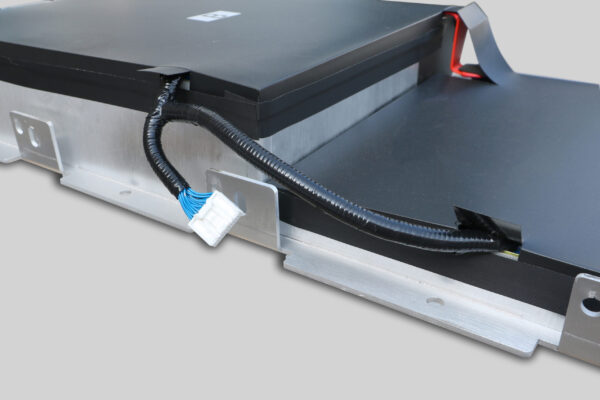
🛠️ DIY Leaf ZE0 Battery Installation: Everything You Need to Know
Are you a Nissan Leaf ZE0 owner facing the dreaded battery degradation? The ZE0 chassis (2011-2013 models) is a classic, but the original batteries often struggle to hold a charge after a decade of service. Replacing it doesn’t mean you have to spend a fortune on a brand-new car or an OEM battery. DIY battery replacement has become a viable and cost-effective solution for many EV enthusiasts.
This guide is designed for owners like you who want to breathe new life into their vehicle. We will walk you through the entire process of installing a new battery pack, focusing on safety, compatibility, and the realistic expectations for a ZE0 retrofit.
⚡ Why Upgrade Your Leaf ZE0 Battery?
The Nissan Leaf ZE0 is a pioneer in the EV world. However, as the battery ages, the range drops significantly—sometimes leaving you with barely enough power for a grocery run. Upgrading to a new lithium battery pack offers:
- Restored Range: Go from 80km back to 200km+ of usable range.
- Cost Efficiency: A replacement battery costs a fraction of a new car.
- Sustainability: Reusing the chassis reduces the environmental impact of scrapping a functional vehicle.
📋 Pre-Installation Checklist
Before you start disconnecting cables, you need to ensure you have the right equipment and environment.
1. Selecting the Right Battery
Not all batteries are created equal. For a ZE0, you need a pack specifically designed for the ZE0 chassis. The ZE0 uses a different Battery Management System (BMS) and physical dimensions compared to the later ZE1 (2013-2017) or AZE0 (2018+) models.
- Compatibility: Ensure the battery vendor confirms compatibility with the “Leaf ZE0” specifically. Many aftermarket batteries are designed for the newer ZE1/AZE0 models and will not fit the ZE0 footprint.
- Cell Chemistry: Modern Lithium Iron Phosphate (LFP) or NMC cells offer better thermal stability than the original packs.
2. Tools Required
You don’t need a professional mechanic’s garage, but you do need the basics:
- Socket Wrench Set: For removing bolts.
- Insulated Gloves: CRITICAL. Always wear high-voltage insulated gloves when working near the battery terminals.
- Torque Wrench: To ensure mounting bolts are tightened to the correct specification (usually around 80-100 Nm, but check your manual).
- Digital Multimeter: To check voltage continuity before and after installation.
3. Workspace
Find a flat, clean, and dry area. You need enough clearance to slide the old battery out and the new one in.
🛡️ Safety First: The Golden Rules
Working with high-voltage batteries requires strict adherence to safety protocols. One mistake can lead to short circuits or injury.
- Disconnect the 12V: Before touching the high-voltage components, always disconnect the negative terminal of the 12V auxiliary battery. This cuts power to the BMS and prevents accidental activation.
- No Jewelry: Remove watches and rings to prevent accidental shorting.
- Inspection: Visually inspect the battery casing for any damage before installation. Do not install a damaged unit.
🛠️ Step-by-Step Installation Guide
The installation process for a Leaf ZE0 is generally considered a “bolt-in” replacement, meaning the new pack should fit the existing mounts and connectors.
Step 1: Removal of the Old Battery
- Access: Remove the rear seats to access the high-voltage interlock connector (if applicable) and the service plug area.
- Unbolt: Remove the underbody panels and the bolts securing the battery to the chassis. There are typically 10-12 large bolts.
- Disconnect: Carefully disconnect the high-voltage (HV) positive and negative terminals. Note their routing.
- Extract: Slowly slide the old battery out. Warning: The ZE0 battery is heavy (approx. 280kg / 617lbs). Use a transmission jack or engine hoist to support the weight.
Step 2: Preparing the New Battery
If you are purchasing a new pack from a reputable manufacturer like CNS Battery, the BMS should be pre-programmed. However, it is good practice to:
- Check the voltage of the new pack with a multimeter (should be around 300-360V for a ZE0).
- Ensure the HV connectors are clean and dry.
Step 3: Installing the New Pack
- Positioning: Carefully lift the new battery into the chassis using your jack. Align it with the mounting points.
- Connect: Reconnect the HV cables. Ensure the polarity is correct (Red/Positive, Black/Negative). Cross-threading can cause fires.
- Secure: Bolt the battery down. Tighten the bolts evenly in a criss-cross pattern to avoid warping the casing.
- Seal: Replace the underbody shields.
Step 4: Reinitialization
- Reconnect 12V: Reconnect the negative terminal of the 12V battery.
- Power On: Turn the car on. You should see the “Ready” light illuminate.
- Check Gauges: The car may initially show 12 bars (full charge) even if the battery isn’t fully charged. This is normal for a new BMS handshake. A full charge cycle will calibrate the State of Charge (SOC).
🤔 Common Challenges & Solutions
- BMS Communication Errors: If the car doesn’t start, the BMS might need a soft reset. Disconnect the 12V for 10 minutes and try again.
- Physical Fitment: If the new battery doesn’t slide in easily, do not force it. Double-check the model compatibility. The ZE0 has unique suspension mount intrusions that later models do not have.
- Charging Issues: If the car won’t charge, verify that the CP (Control Pilot) and PP (Proximity Pilot) signal wires are properly connected at the inlet.
💡 Expert Advice: Why Professional Guidance Matters
While this is a DIY guide, the complexity of high-voltage systems means having a backup plan is essential. At CNS Battery, we specialize in OEM-compatible solutions for Nissan and BMW vehicles. We don’t just sell batteries; we provide lifetime technical support.
If you encounter a wiring issue or a programming hiccup during your ZE0 swap, our engineers are available for remote video guidance to walk you through the fix. We ensure that every battery is tested for compatibility with your specific VIN before it ships.
📝 Frequently Asked Questions (FAQ)
1. How long does it take to install a Leaf ZE0 battery?
For a professional mechanic, the physical swap usually takes 1 to 2 hours. For a DIYer with basic tools, budget 3 to 4 hours to be safe, especially when removing the heavy old pack.
2. Is the installation truly “Plug and Play”?
For the Leaf ZE0, the physical connection is plug-and-play (same bolt pattern and connector types). However, the BMS programming might require a handshake with the car’s ECU. Most modern replacement batteries come pre-programmed, but having a technician with a Consult-III cable nearby is recommended for the first power-up.
3. What is the warranty on a DIY installed battery?
Most reputable manufacturers, including CNS Battery, offer a standard warranty (e.g., 2 years / 80,000 km) regardless of whether a professional or the owner installs the battery. However, the warranty is usually voided if physical damage (like dropping the battery or cross-threading bolts) is found during inspection.
4. Can I use a ZE1 or AZE0 battery in my ZE0 car?
No, you cannot. The physical dimensions, weight distribution, and BMS communication protocols are different. You must purchase a battery specifically listed as compatible with the Nissan Leaf ZE0 (2011-2013).
🚀 Ready to Restore Your Range?
Replacing the battery in your Nissan Leaf ZE0 is one of the most rewarding modifications you can make. It transforms an unreliable old car into a dependable daily driver.
If you are looking for a high-quality, compatible battery solution backed by expert technical support, we are here to help. Don’t let battery degradation kill your EV dream.
👉 Get Your Free Custom Quote for a Nissan Leaf ZE0 Battery Now



