
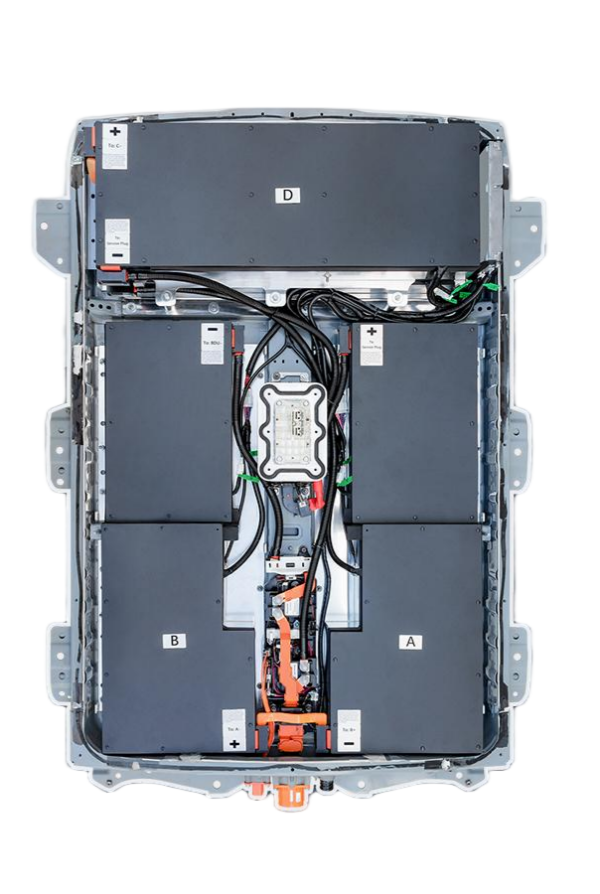
DIY e-NV200 Van Battery Replacement: Everything You Need to Know
Is your Nissan e-NV200 struggling to make it through a full workday? Are you tired of watching the range plummet every time you turn on the heater? You’re not alone. As one of the most popular electric commercial vans in Europe, the e-NV200 is a workhorse, but its battery degradation over time can be a major headache for small businesses and delivery drivers.
Replacing the battery in an e-NV200 doesn’t have to mean a trip to the dealership and a massive bill. With the right preparation and the right parts, a DIY e-NV200 van battery replacement is a viable, cost-effective solution that can breathe new life into your vehicle.
This guide will walk you through the entire process, from understanding your battery options to the step-by-step installation, ensuring you can get back on the road with confidence.
Why Consider a DIY e-NV200 Battery Replacement?
The standard e-NV200 battery pack is rated at 24 kWh, which provides a range of approximately 100 miles (170 km) under ideal conditions. However, as the battery ages, this range can drop significantly, often leaving drivers stranded.
There are three primary reasons why owners are opting for a DIY replacement:
- Cost Savings: Dealership replacements can cost upwards of $10,000 to $15,000. A high-quality aftermarket replacement can cut this cost in half.
- Increased Capacity: Many owners are upgrading from the standard 24 kWh to a 40 kWh or 50 kWh lithium-ion battery pack. This upgrade can nearly double your driving range, making the van viable for longer routes.
- Availability: Finding OEM replacements can be difficult. Specialized manufacturers like CNS Battery keep these commercial vans running with readily available stock.
Choosing the Right Battery for Your DIY Project
Before you jack up your van, you need to select the correct battery. Not all lithium-ion packs are created equal, and compatibility with the Nissan Leaf/e-NV200 platform is crucial.
1. Understanding the Compatibility
The Nissan e-NV200 shares its platform and battery technology with the Nissan Leaf (specifically the ZE0 and ZE1 generations). This means you can often utilize battery packs designed for the Leaf, provided they match the physical dimensions and voltage requirements of the van.
2. New vs. Refurbished
This is the most critical decision:
- Refurbished/Recycled: These are old packs pulled from salvage vehicles. While cheap, they often contain degraded cells, have a high risk of swelling, and offer very short warranties (or none at all).
- New OEM-Compatible (Recommended): Companies like CNS Battery manufacture new packs using brand-new CATL (Contemporary Amperex Technology) cells. These are the same high-tier cells found in major EV brands, offering superior safety, longevity, and performance compared to recycled options.
3. Capacity Upgrade Options
If your van originally had a 24 kWh pack, you have the option to upgrade:
- 40 kWh: A significant upgrade, restoring range to near-new levels.
- 50 kWh / 62 kWh: For heavy-duty use, these larger packs offer the maximum range possible for the platform.
Step-by-Step DIY Installation Guide
Replacing the battery is a major mechanical task. While it is possible to do it yourself, you must follow strict safety protocols. Always wear insulated gloves and safety glasses.
Tools You Will Need
- Floor jack and jack stands
- Socket set (metric)
- Torque wrench
- Insulated screwdrivers
- Diagnostic tool (to reset the BMS if necessary)
The Installation Process
Step 1: Safety First
Park the van on a flat surface and engage the parking brake. You must disconnect the 12V auxiliary battery to cut power to the vehicle’s systems before touching the high-voltage components.
Step 2: Access the Battery Pack
The e-NV200 battery is located under the floor of the cargo area.
- Remove the rear seats.
- Carefully peel back the carpet and underlay to expose the access panels.
- Remove the floor panels to expose the high-voltage connectors and mounting bolts.
Step 3: Disconnect the Old Pack
- Locate the main service disconnect (usually a bright orange latch).
- Disconnect all high-voltage cables and low-voltage signal wires. Take photos during this step to remember the wiring layout.
- Disconnect the charging port connections if applicable.
Step 4: Remove and Replace
- Use a floor jack to support the battery cradle.
- Remove the mounting bolts securing the old pack.
- Carefully lower the old pack and slide in the new CNS Battery pack.
- Reinstall the mounting bolts and torque them to the manufacturer’s specifications.
Step 5: Reconnection and Testing
- Reconnect all the signal wires and high-voltage cables. Ensure the connectors are fully seated and locked.
- Reinstall the floor panels and seats.
- Reconnect the 12V battery.
- Turn on the ignition. The dashboard should show a full charge if the Battery Management System (BMS) is properly calibrated.
Expert Tip: Most modern compatible packs, like those from CNS, come with pre-programmed BMS units that communicate seamlessly with the Nissan dashboard. However, if you encounter a warning light, a simple diagnostic reset may be required, which our technical support team can guide you through.
Why Choose a CNS Battery for Your e-NV200?
When undertaking a DIY e-NV200 van battery replacement, you need a partner you can trust. CNS Battery specializes in OEM-compatible solutions for Nissan and BMW vehicles.
Here is why our batteries are the preferred choice for DIYers and professionals alike:
- Built with New CATL Cells: We don’t use recycled junk. Our packs use brand-new, top-tier cells for maximum energy density and thermal stability.
- Plug-and-Play Design: Our batteries are engineered to match the OEM dimensions and connectors, minimizing the risk of errors during your DIY install.
- Unbeatable Warranty: We stand by our quality with a 2-year / 80,000 km warranty. This covers manufacturing defects and ensures that your battery maintains at least 70% capacity over the warranty period.
- Expert Support: If you get stuck, our technical experts are available to guide you through the process via video call or email.
Frequently Asked Questions (FAQ)
1. Is it safe to replace the battery myself?
Yes, provided you follow the safety procedures strictly. Always disconnect the 12V battery first and wear protective gear. If you are uncomfortable working with high voltage, we recommend hiring a certified mechanic, though many of our customers successfully install the packs themselves with the help of our video guides.
2. Will a new battery fit my older e-NV200 model?
Absolutely. Our batteries are designed to be compatible with the entire Nissan Leaf and e-NV200 model range (ZE0, ZE1, AZE0). We offer free compatibility checks; simply provide your VIN number to our sales team before purchasing.
3. How much does a DIY e-NV200 battery replacement cost?
Compared to a dealership, the savings are substantial. While dealer replacements can exceed $12,000, a high-quality new 40 kWh or 50 kWh pack from CNS typically costs about 50% less, often ranging between $6,000 and $8,000 depending on the capacity and your location.
4. How long does the installation take?
For a professional technician, the swap usually takes about 1 to 2 hours. For a DIYer doing it for the first time, expect it to take a full afternoon (3-4 hours) to ensure you do it safely and correctly.
5. Do I need to reprogram the car’s computer?
In most cases, no. Our batteries use the standard Nissan communication protocols. However, if your car’s software is very old, a simple BMS reset might be needed, which our customer service can assist you with remotely.
Ready to upgrade your e-NV200 and save thousands? Don’t let a bad battery sideline your business.

