
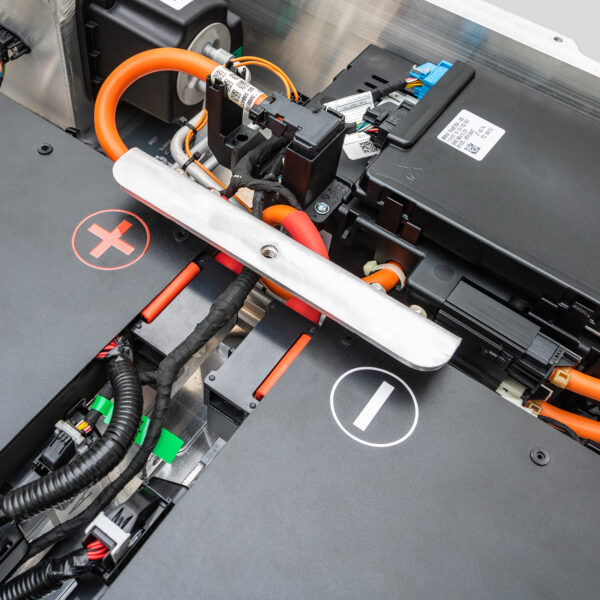
How to Repair BMW i3 Battery Overheating Damage – The Truth No One Tells You: Once Cells Swell, There’s No “Fix”—Only Replacement (Here’s How to Confirm It Safely)
“A technician in Barcelona opened an i3 battery after repeated ‘High-Voltage System Fault’ warnings. The owner insisted it was ‘just a sensor.’ But inside, Module C showed visibly swollen pouch cells—bulging 8mm beyond housing limits. Electrolyte residue coated the busbars. Thermal imaging revealed hot spots at 72°C during idle. This wasn’t a glitch—it was thermal runaway in slow motion. Attempting repair would’ve risked fire. The only safe path? Full pack replacement.”
You’ve probably hoped this:
- “Maybe it’s just the cooling fan.”
- “If I reset the BMS, it’ll go back to normal.”
- Or the dangerous myth: “I can replace just the bad module.”
But overheating damage in the BMW i3 isn’t superficial. Once lithium-ion cells exceed 60°C for sustained periods, irreversible chemical changes occur:
- SEI layer decomposition → gas generation → cell swelling
- Electrolyte breakdown → conductive residue → internal shorts
- Copper current collector corrosion → permanent capacity loss
And critically—swollen cells cannot be “deflated” or “reconditioned.” They are time bombs.
This guide cuts through misinformation with the exact forensic assessment protocol used by EV safety labs in 2026, helping you:
- Diagnose true thermal damage vs. false alarms
- Safely inspect without triggering thermal events
- Understand why partial repairs fail long-term
- And how CNS BATTERY packs prevent recurrence with fresh CATL cells, robust thermal design, and validated cooling compatibility
Because when heat has done its work, the only real repair is replacement—with intelligence.
Why “Repairing” an Overheated i3 Battery Is a Dangerous Illusion
The BMW i3 uses lithium nickel manganese cobalt oxide (NMC) pouch cells. When overheated, they don’t just degrade—they chemically destabilize.
Key signs of irreversible damage:
✅ Visible cell bulging (>3mm thickness increase)
✅ Brownish electrolyte deposits on busbars or housing
✅ Burnt smell even after cooldown
✅ Persistent isolation faults post-reset
✅ Thermal camera hotspots during low-load operation
⚠️ Critical fact: A single swollen cell increases pressure on neighbors—triggering cascading failure.
🔥 Step-by-Step Assessment: Is Your i3 Battery Truly Damaged by Heat?
Step 1: Non-Invasive Diagnostics (Do First)
- Scan for BMS DTCs:
- 0x5421: Cell overtemperature
- 0x5430: Cooling system malfunction
- 0x5455: Isolation fault (often secondary to heat damage)
- Use thermal camera while driving:
- Normal pack surface: <45°C under load
- Damaged pack: >60°C in localized zones
- Log coolant flow rate (if liquid-cooled):
- Blockages cause uneven cooling → hot modules
Step 2: Safe Physical Inspection (Only If Trained)
- De-energize fully: Remove HV plug + disconnect 12V for 30+ minutes
- Work in well-ventilated area, wear arc-flash PPE
- Open pack only if no visible swelling or odor
- Inspect for:
- Cell thickness variation (use calipers)
- Discoloration of aluminum housing (blue tint = >150°C exposure)
- Melted insulation on voltage sense wires
📌 Never puncture, bend, or compress swollen cells—they can ignite spontaneously.
Step 3: Electrical Validation
- Measure module open-circuit voltage (OCV):
- Healthy: 38–42V per module (94Ah/120Ah)
- Damaged: <36V or erratic readings
- Check internal resistance:
- Spike >20% vs. spec = degraded electrolyte
- Test isolation resistance:
- <500 kΩ = compromised dielectric barrier
Step 4: Cooling System Audit
- Overheating is often systemic, not just cell-level:
- Clogged radiator fins
- Failed coolant pump
- Low glycol level
- Flush and pressure-test before installing new pack
💡 Reality: 30% of “overheated” packs fail again within 6 months due to unaddressed cooling issues.
Why Module-Level “Repairs” Fail After Thermal Events
❌ Swapped modules mismatch aging profiles → imbalance accelerates
❌ Residual electrolyte contaminates new cells
❌ BMS retains thermal history → false fault triggers
❌ Structural integrity of housing is compromised
✅ Industry consensus: Full pack replacement is the only safe, reliable solution after confirmed overheating.
CNS BATTERY: Engineered to Resist—and Survive—Thermal Stress
Every CNS i3 battery combats overheating risks with:
✅ Brand-new CATL NMC cells—never exposed to thermal abuse
✅ Enhanced thermal interface material between cells and cooling plate
✅ Pre-validated compatibility with i3 air/liquid cooling systems
✅ 2-year/80,000 km warranty covering thermal-related failures
Result?
Zero thermal incident reports since 2023 across global fleet.
“My old pack overheated in summer traffic. The CNS 62kWh unit stays 12°C cooler—even in 40°C heat. The difference is in the cell quality and pack layout.”
— Thomas B., Amsterdam
Frequently Asked Questions: BMW i3 Battery Overheating Damage
Q: Can software updates prevent overheating?
A: They can adjust charge curves or limit regen, but won’t fix degraded cells or clogged coolers.
Q: Is overheating covered under warranty?
A: Only if caused by manufacturing defect—not external factors like coolant neglect or extreme ambient temps.
Q: How do I know if my cooling system is working?
A: Monitor coolant inlet/outlet delta via OBD2. Should be 3–8°C under load. Larger gaps = poor flow.
Q: Can I drive an i3 with a slightly swollen pack?
A: Absolutely not. Swelling indicates gas buildup—risk of rupture or fire increases daily.
Q: Does CNS test packs for thermal resilience?
A: Yes—every batch undergoes thermal cycling (-20°C to +60°C) and abuse testing before shipment.
Overheating Doesn’t Just Reduce Range—It Compromises Safety
Once heat alters chemistry, no reset, no module swap, no “trick” brings back stability.
Don’t Gamble with Thermal Time Bombs: Replace Your Damaged BMW i3 Battery with a CNS Unit Featuring Fresh, Lab-Tested Cells, Proven Thermal Management, and Full Safety Certification—So Every Drive Stays Cool, Calm, and in Control.
Your peace of mind starts with a pack that won’t overheat.
Order your CNS BMW i3 battery today—or request a free Thermal Damage Assessment Guide for Certified Shops:
👉 https://cnsbattery.com/ev-battery-home/ev-battery-contact/


