
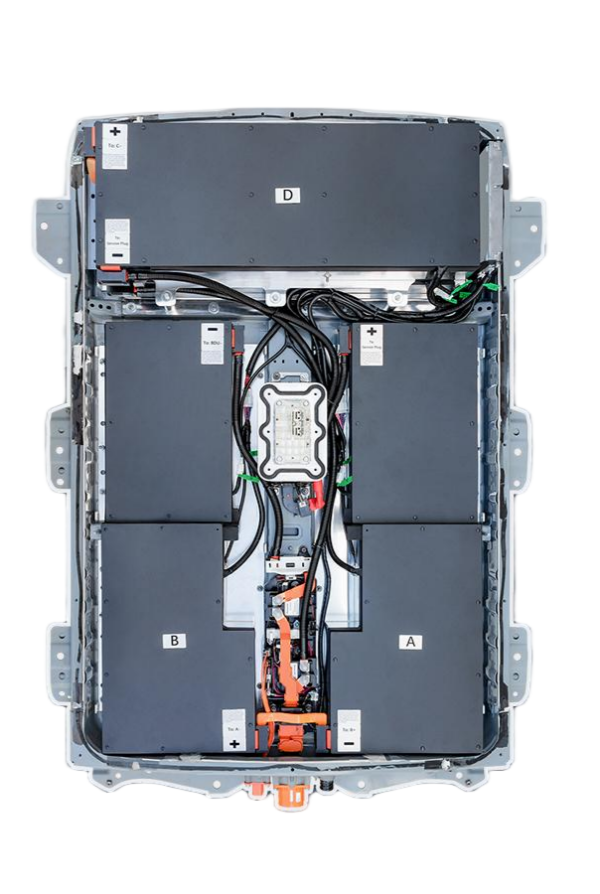
The Complete AZE0-1 Battery Testing Protocol: Ensure Your Nissan Leaf’s Power is 100% Reliable
Is your Nissan Leaf’s range suddenly dropping? That unexpected “Check Battery” warning on your dashboard could mean more than just a simple glitch. Many Leaf owners face this frustration when their AZE0 battery begins to degrade, leaving them stranded or facing costly repairs. But what if you could diagnose the issue before it becomes a major problem? This guide reveals the precise steps to test your Nissan Leaf AZE0 battery system and determine whether a replacement is truly necessary.
Why AZE0 Battery Testing Matters More Than You Think
The Nissan Leaf AZE0 model (2013-2017) was designed with a specific battery architecture that requires precise testing methods. Unlike generic battery testers, proper AZE0 battery diagnostics must account for the unique BMS (Battery Management System) configuration, cell chemistry, and thermal management system specific to this model.
Many DIY enthusiasts make the critical mistake of using standard multimeters or generic EV battery testers, which simply won’t provide accurate readings for your AZE0 battery. This often leads to unnecessary replacements or false positives that could have been resolved with proper testing.
Step-by-Step AZE0 Battery Testing Procedure
Step 1: Prepare Your Testing Environment
Before you begin, ensure your Nissan Leaf is parked in a safe location with the parking brake engaged. Turn off all electrical systems, including climate control, lights, and entertainment systems. Disconnect the 12V auxiliary battery to prevent any electrical interference during testing.
Pro Tip: Always test your battery when the temperature is between 20-25°C (68-77°F) for the most accurate readings.
Step 2: Access the Battery Management System
Connect your OBD-II scanner to the diagnostic port (located under the steering wheel). Select the “Battery Management System” or “HV Battery” diagnostic mode. For Nissan Leaf AZE0 models, you’ll need a scanner that supports Nissan’s proprietary protocols.
Critical Note: Generic OBD-II scanners often fail to read Nissan Leaf-specific codes. Consider using a Nissan-specific diagnostic tool or consult with a certified technician.
Step 3: Perform a Comprehensive Voltage Check
With the scanner connected, perform a voltage check on each battery module. The AZE0 battery consists of multiple modules (typically 18-24), and you should measure the voltage of each individual module.
Normal voltage range: 3.2-3.7V per cell (for a 40kWh AZE0 battery)
Warning sign: Any cell below 3.0V or above 4.0V indicates potential cell imbalance.
Important: A fully charged AZE0 battery should read approximately 360V at the main battery pack. If your reading is significantly lower, it suggests capacity degradation.
Step 4: Check for Error Codes
Scan for specific error codes related to the battery. For AZE0 models, pay special attention to codes like:
- B1400: Battery Cell Temperature Sensor Error
- B1401: Battery Cell Voltage Imbalance
- B1402: Battery Pack Voltage Low
These codes provide crucial information about the nature of the battery issue.
Step 5: Perform a Capacity Test
This step requires specialized equipment. Using a battery load tester, simulate a 50% discharge cycle while monitoring the voltage drop. A healthy AZE0 battery should maintain at least 85% of its rated capacity after this test.
Red Flag: If the voltage drops below 3.0V during the test, it indicates significant cell degradation that may require replacement.
Step 6: Analyze the BMS Data
Review the BMS data for any inconsistencies. Pay particular attention to:
- Cell voltage variation (should be < 0.1V between cells)
- Temperature consistency across the battery pack
- Charging and discharging rates
Why CNS BATTERY’s AZE0 Solutions Outperform Generic Replacements
After performing your AZE0 battery test, you might discover that your battery needs replacement. Here’s why CNS BATTERY’s AZE0 battery solutions stand out:
✅ CATL Brand New Cells, Not Refurbished
Unlike many competitors who use refurbished or second-hand cells, CNS BATTERY uses brand new CATL cells – the same quality as Nissan’s original manufacturer. This ensures consistent performance and longevity.
✅ Perfect OEM Compatibility
CNS BATTERY’s AZE0 batteries are engineered to match Nissan’s exact specifications, including the correct BMS communication protocol. This means no compatibility issues or error codes after installation.
✅ Extended Warranty Protection
While most replacements offer only 1-year warranties, CNS BATTERY provides a 2-year/80,000km warranty – the most comprehensive coverage in the industry.
✅ Real-World Performance
Customers report up to 200km more range after switching to CNS BATTERY’s AZE0 batteries, with consistent performance even in extreme temperatures.
The Cost of Waiting: How Battery Degradation Affects Your Nissan Leaf
Ignoring AZE0 battery degradation can lead to serious consequences:
- Reduced range from 160km to as low as 80km on a full charge
- Increased charging times due to inefficient battery management
- Potential damage to the BMS if the battery is severely degraded
- Higher long-term costs from frequent repairs
Replacing your AZE0 battery with a high-quality solution like CNS BATTERY’s can save you thousands compared to Nissan’s original manufacturer pricing.
Ready to Restore Your Nissan Leaf’s Full Potential?
Don’t gamble with your battery health. If your AZE0 battery test reveals significant degradation, it’s time to consider a professional replacement solution that matches Nissan’s original factory specifications.
CNS BATTERY offers the most reliable AZE0 battery replacements on the market, with:
- 100% compatibility with your Nissan Leaf AZE0 model
- Brand-new CATL battery cells for superior performance
- 2-year/80,000km warranty for complete peace of mind
- Expert installation guidance to ensure a seamless transition
Frequently Asked Questions
Q: How long does AZE0 battery testing take?
A: A thorough AZE0 battery test typically takes 20-45 minutes, depending on the equipment used. If you’re doing it yourself, allow extra time for setup and data interpretation.
Q: Can I test my AZE0 battery at home without professional tools?
A: While basic voltage checks can be done at home, a comprehensive AZE0 battery test requires specialized equipment. We recommend having it done by a certified technician for accurate results.
Q: What’s the difference between AZE0 and ZE0 batteries?
A: The AZE0 (2013-2017) uses a different battery management system and cell configuration than the ZE0 (2011-2013). They’re not directly interchangeable, so it’s crucial to verify your specific model.
Q: How do I know if my AZE0 battery needs replacement?
A: If your battery shows:
- More than 20% capacity loss
- Voltage inconsistencies exceeding 0.2V between cells
- Frequent error codes related to battery health
- Reduced range that can’t be explained by driving habits
It’s time to consider a replacement.
Take Action Today – Restore Your Nissan Leaf’s Full Range
Don’t let a degraded AZE0 battery limit your driving freedom. With CNS BATTERY, you get a battery that performs like new, with the quality and reliability you deserve.
Get your personalized AZE0 battery solution today with a free compatibility check. Our experts will confirm your battery’s exact needs and provide a precise quote for your Nissan Leaf model.


