
Here is the SEO-optimized article tailored for Nissan Leaf owners seeking battery replacement solutions.
Nissan Leaf SV New Battery Replacement Tutorial: A Step-by-Step Guide
Is your Nissan Leaf SV’s range no longer cutting it? If you own a Nissan Leaf SV (or ZE0/AZE0/ZE1 models) and are facing the dreaded “range anxiety,” you’re not alone. Battery degradation is a natural part of an EV’s lifecycle. However, replacing your battery doesn’t have to mean selling your car or paying the exorbitant prices of the original manufacturer. In this comprehensive guide, we will walk you through the process of replacing your Nissan Leaf SV battery with a modern, high-capacity solution. Whether you are a DIY enthusiast or a professional mechanic, this tutorial provides the insights you need to revive your electric vehicle.
Why Replace Your Nissan Leaf Battery?
Before we dive into the technical steps, let’s understand why a replacement is often the best solution. Many Leaf SV owners find that after 5-8 years, their battery capacity drops below 70%, significantly reducing the driving range. While the original 24kWh or 30kWh packs might have been sufficient initially, today’s aftermarket solutions—like the CNS BATTERY 62kWh lithium battery pack—offer a massive upgrade.
By replacing your old module with a new, higher-capacity pack, you can:
- Double your range (up to 440km on a full charge).
- Restore factory performance and charging speeds.
- Save over 50% compared to buying a new car or an OEM replacement.
Pre-Installation: Choosing the Right Fit
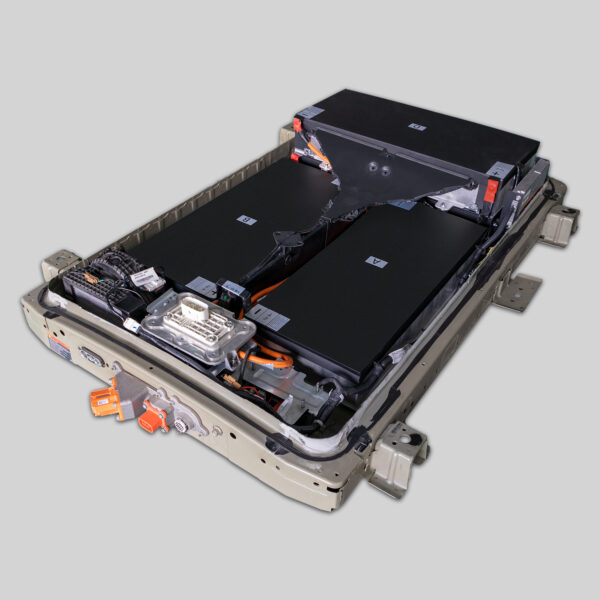
Not all battery packs are created equal. For a Nissan Leaf SV replacement, compatibility is key. At CNS BATTERY, we specialize in OEM-standard R&D, ensuring our packs fit perfectly into the Leaf’s chassis without modifications.
Key Specifications for Your Leaf SV:
- Models Supported: Leaf ZE0, AZE0, ZE1.
- Recommended Upgrade: 62kWh Lithium Battery Pack.
- Core Technology: Brand-new CATL battery cells for maximum safety and longevity.
Before you start, ensure you have selected the correct KWH rating for your model year. Our team offers a free VIN compatibility assessment to guarantee a perfect plug-and-play fit.
Step 1: Safety First and Preparation
Safety is paramount when handling high-voltage components.
- Park Safely: Ensure the vehicle is on a flat, level surface.
- Disconnect Power: Open the hood and disconnect the 12V auxiliary battery to cut all power.
- Gear Position: Make sure the gear selector is in Park.
- Tools Needed: Insulated wrenches, jack stands, and personal protective equipment (PPE).
Step 2: Removing the Old Battery Pack
The Nissan Leaf battery is located under the vehicle’s floor.
- Lift the Vehicle: Use a hydraulic jack to lift the car and secure it with jack stands. Remove the underbody cover.
- Disconnect Cables: Locate the high-voltage (HV) connectors and the signal cables. Carefully disconnect them. Note: Do not force the connections; they are designed to release with a specific mechanism.
- Remove Mounting Brackets: There are several mounting bolts securing the battery to the chassis. Remove these bolts systematically.
- Lower the Pack: With the help of a lift or a sturdy sling, carefully lower the old battery pack from underneath.
Step 3: Installing the New CNS BATTERY Pack
This is where the magic happens. The CNS BATTERY pack is designed for a seamless drop-in replacement.
- Positioning: Carefully lift the new 62kWh lithium battery pack into the chassis cavity.
- Reconnect Cables: Reconnect the high-voltage cables and the signal lines. The connectors are color-coded and keyed to match the factory specifications, preventing incorrect installation.
- Secure the Mounts: Tighten the mounting brackets and bolts to the factory torque specifications.
- Reinstall Underbody Cover: Ensure the cover is properly sealed to protect the battery from road debris and water.
Step 4: System Integration and Programming
Once the physical installation is complete, the vehicle needs to recognize the new battery.
- Reconnect 12V: Reconnect the auxiliary battery.
- BMS Programming: This is a critical step. The Battery Management System (BMS) must be programmed to communicate with the vehicle’s ECU. Most users report that the programming is successful on the first try using standard OBD2 tools.
- Diagnostic Test: Run a full diagnostic scan to ensure there are no error codes. The dashboard should display the new full charge capacity.
Post-Installation Care and Warranty
Congratulations! Your Nissan Leaf SV is now back on the road with a brand-new heart. To ensure longevity:
- First Charge: Perform a full charge cycle to calibrate the State of Charge (SOC).
- Winter Care: If you live in a cold climate, utilize the thermal management system effectively.
Peace of Mind Guarantee:
At CNS BATTERY, we stand by our craftsmanship. Every new battery replacement comes with an unbeatable 2-year or 80,000 km warranty. This covers defects in materials and workmanship, and we guarantee the battery maintains at least 70% capacity during this period.
Frequently Asked Questions (FAQ)
Q1: Is the installation really “plug-and-play” for the Nissan Leaf SV?
Yes. The CNS BATTERY pack is engineered to OEM standards. The connectors, mounting points, and interface match the original factory design. While physical installation is plug-and-play, the BMS does require programming to sync with your car’s computer, which our technical team can assist with.
Q2: How much does it cost to replace a Nissan Leaf SV battery?
Replacing a battery with a brand-new aftermarket solution like CNS BATTERY typically costs about 50% less than purchasing a replacement from the original manufacturer. This makes it a highly cost-effective alternative to buying a new electric vehicle.
Q3: How long does the replacement process take?
For a professional technician, the replacement usually takes 1 to 2 hours. DIY users might take a bit longer, especially if it is their first time, but our detailed video tutorials and step-by-step manuals make it manageable.
Q4: What if I encounter a problem during installation?
We offer lifetime technical support. If you get stuck, our experts are available via video call or email to guide you through troubleshooting, ensuring you don’t face the job alone.
Q5: Are these batteries safe?
Absolutely. We utilize brand-new, top-tier CATL battery cells and adhere to strict global manufacturing standards. Our batteries undergo rigorous testing for safety, including thermal runaway prevention and short-circuit protection.
Ready to upgrade your Nissan Leaf SV? Get a free quote and compatibility check today.

