
How to Install a New Battery in a Nissan Leaf: The Ultimate DIY Upgrade Guide
Is your Nissan Leaf feeling sluggish? Has the dreaded “Lemon Bar” appeared on your dashboard? If your trusty electric steed’s range has dropped significantly, you don’t need to buy a new car. Replacing the battery pack is a cost-effective way to breathe new life into your vehicle. At CNS BATTERY, we specialize in high-performance, OEM-compatible battery solutions that offer the same reliability as the original factory parts but at a fraction of the cost.
This comprehensive guide will walk you through the entire process of installing a new battery in your Nissan Leaf. Whether you are a seasoned mechanic or a determined DIYer, this upgrade is simpler than you might think. We will cover the tools you need, the step-by-step installation process, and the incredible benefits of choosing a CNS BATTERY pack.
Why Upgrade Your Nissan Leaf Battery?
Before we dive into the “how,” let’s talk about the “why.” The Nissan Leaf has been a pioneer in the EV market, but like all batteries, its capacity fades over time. If you are facing high repair quotes from dealerships, an aftermarket upgrade is a smart financial decision.
The CNS BATTERY Advantage:
- Cost Savings: Save over 50% compared to the original manufacturer’s price.
- Brand-New Quality: We use brand-new, top-tier CATL battery cells, ensuring superior performance and safety, unlike recycled or refurbished units.
- Extended Warranty: We back our confidence with a robust 2-year / 80,000 km warranty, covering defects and capacity degradation (maintaining at least 70% capacity).
- Plug-and-Play Design: Our packs are engineered for perfect OEM compatibility, meaning no modifications are required for your Leaf’s specific model (ZE0, AZE0, or ZE1).
Preparing for the Installation
Safety First
Working with high-voltage components requires strict safety protocols. Before you begin, please ensure you have the following:
- Protective Gear: Insulated gloves and safety glasses are mandatory.
- Tools: A standard socket wrench set, torque wrench, and basic hand tools.
- Environment: Work in a clean, dry, and well-ventilated area. Ensure the vehicle is powered off and the key is removed.
What to Expect
Based on feedback from our customers and professional repair shops, a standard battery replacement typically takes 1 to 2 hours. If you are working alone, having a friend assist you with lifting the heavy pack is highly recommended.
Step-by-Step Installation Guide
Follow these detailed steps to successfully install your new CNS BATTERY pack. This process applies to all compatible Nissan Leaf models (2011-2023).
1. Disconnect the Vehicle Power
- Open the hood and locate the 12V auxiliary battery.
- Disconnect the negative terminal (-) to cut all power to the vehicle’s systems. This is crucial to prevent short circuits during the procedure.
2. Remove the Old Battery Mounting Brackets
- Drive your vehicle onto a lift or use jack stands to access the undercarriage safely.
- Remove the plastic underbody covers to expose the battery casing.
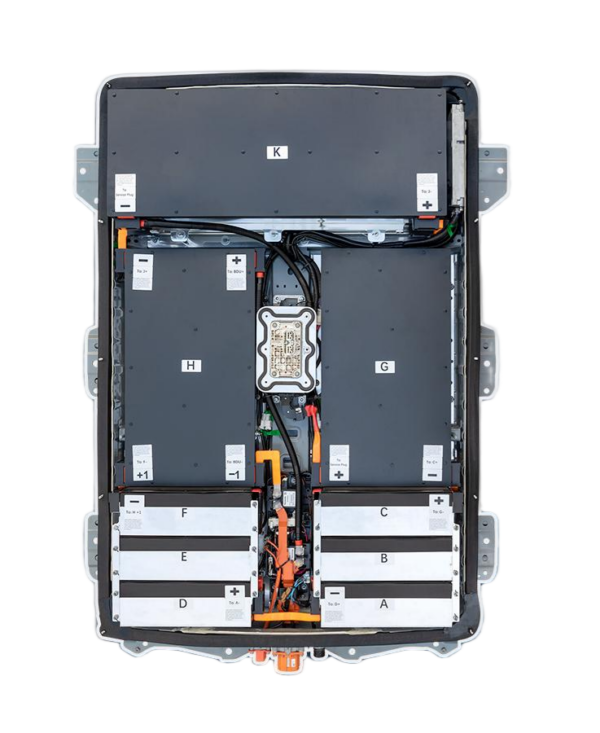
- Carefully disconnect the high-voltage cables and the signal connectors from the old battery.
- Loosen the bolts securing the battery to the chassis and remove the old unit.
3. Connect the New Battery Cables
- Position the new CNS BATTERY pack into place. Thanks to our OEM-standard design, the mounting points will align perfectly.
- Reconnect the high-voltage cables and signal lines. Our connectors are color-coded to match the factory specifications, ensuring you cannot make a mistake.
4. Test Voltage and System Integration
- Before fully tightening all bolts, reconnect the 12V negative terminal briefly to check the voltage.
- Use a diagnostic scanner (or the vehicle’s dashboard) to ensure the BMS (Battery Management System) is communicating correctly with the vehicle.
5. Reassemble and Run Diagnostics
- Once the voltage check is successful, fully tighten all mounting bolts to the manufacturer’s torque specifications.
- Replace the underbody covers and plastic shields.
- Power the vehicle on. You should see a full charge bar immediately. Take the car for a short test drive to ensure the regenerative braking and power delivery are functioning normally.
Expert Tip: If you encounter any issues during the BMS programming or connection steps, our technical support team offers free remote video guidance. We can connect via Zoom or similar platforms to guide you through the final steps in real-time.
Real Results from Real Owners
Don’t just take our word for it. Here is how our customers have benefited from upgrading with CNS BATTERY:
- Mark T. (California, USA): “Replaced my 2015 Leaf ZE0 40kWh battery with a CNS 62kWh unit. The installation was plug-and-play, taking only 2 hours. My range jumped from 120km back to 430km. The cost was less than half of the dealership quote!”
- Mike’s Auto Service (Vancouver, Canada): “As a repair shop, we use CNS for all our Leaf battery replacements. Their pre-sales VIN compatibility check is perfect, and we have experienced virtually zero failure rates with their brand-new CATL cells.”
Frequently Asked Questions (FAQ)
Q1: Is the installation really DIY-friendly?
Absolutely. While we recommend a certified technician for warranty peace of mind, many of our customers successfully install the battery themselves. We provide high-definition tutorial videos and PDF manuals covering every safety precaution. If you are comfortable changing your own oil or brakes, you can likely handle this upgrade.
Q2: Will this void my car’s warranty?
Our batteries are designed to meet OEM voltage and interface standards. However, we always recommend checking your specific vehicle warranty terms. To ensure a perfect match, we offer a free compatibility assessment; simply upload your VIN code to our support team before purchasing.
Q3: How long does the battery last after installation?
Thanks to the use of brand-new CATL cells and our advanced engineering, our batteries offer a lifespan far exceeding refurbished alternatives. Backed by our 2-year warranty, you can expect consistent performance and minimal degradation for years of reliable driving.
Q4: What if I run into trouble during the install?
Our customer service team is here to help. We offer technical advice, installation guidance, and after-sales troubleshooting. Most issues are resolved within 24 hours. For complex programming questions, we can arrange a video call with an expert to guide you step-by-step.
Ready to Revive Your Nissan Leaf?
Stop letting battery degradation limit your driving range. With CNS BATTERY, you get a high-quality, brand-new lithium-ion pack that fits your Nissan Leaf perfectly and saves you thousands of dollars.
Simple steps to get started:
- Select your vehicle model.
- Enter your specifications preferences.
- Submit to receive personalized recommendations.
Get Your Free Custom Quote Now
CNS is committed to reliable battery innovation, helping you extend your range and improve safety. Data is encrypted; you can unsubscribe at any time.


