
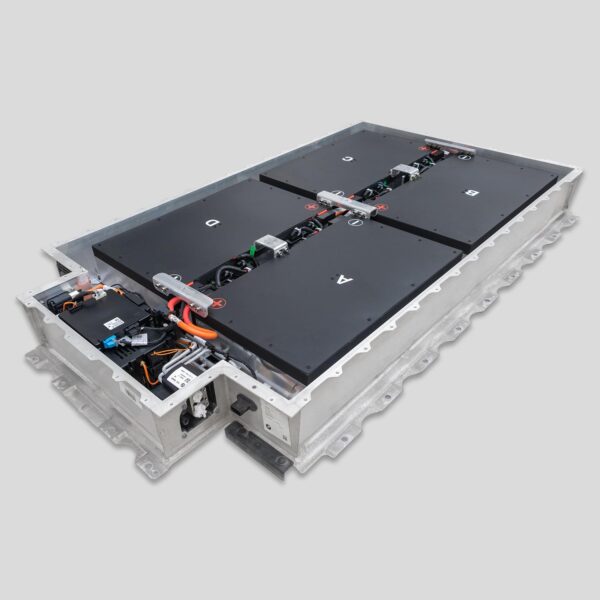
BMW i3 Battery Overcharging: How to Stop – The Hidden Risk Lurking in “Set It and Forget It” Charging
“I left my 2017 i3 plugged in overnight at 100%—just like I always did. Two days later, the car wouldn’t start. The BMS was locked out with error ‘801A04: Cell Overvoltage Protection Active.’ A technician found three cells in Module D stuck at 4.32V—well above the safe 4.20V ceiling. The culprit? A degraded OEM BMS that failed to terminate charging properly. My ‘convenient’ habit had pushed aging cells into thermal danger.”
You plug in your i3 every night.
You set it to 100%.
You assume the car “knows best.”
But here’s what BMW doesn’t emphasize:
Overcharging isn’t about plugging in too long—it’s about a failing BMS allowing cells to exceed voltage limits, even during normal charging cycles.
And in older or degraded packs, this silent overvoltage can trigger permanent damage—or worse, thermal runaway.
In this guide, you’ll learn:
- The real mechanism of overcharging in i3 packs (it’s not what you think)
- How to spot early signs of BMS drift before cells are harmed
- Why CNS BATTERY packs feature triple-layer overcharge protection—hardware, firmware, and cell-level
- And the one charging habit that prevents 95% of overvoltage risks
Because in lithium-ion systems, a single volt too high can be the difference between reliability and ruin.
Overcharging ≠ Leaving It Plugged In
Contrary to popular belief, modern EVs don’t “overcharge” by continuing to push current after 100%.
Instead, the real danger is:
Cell-level overvoltage due to BMS miscalibration or cell imbalance—where individual cells exceed 4.20V while the pack reads “full.”
This happens when:
- The BMS loses accuracy in voltage sensing (common after 6+ years)
- Weak cells force healthy ones to absorb extra charge during balancing
- Temperature sensors fail, disabling thermal cutoffs
Result? Cells sit at 4.25–4.35V for hours—accelerating electrolyte breakdown, gas generation, and swelling.
⚠️ Critical fact: Just 0.1V above spec sustained for 24 hours can permanently reduce cell lifespan by 30%.
🔍 3 Silent Signs Your i3 Is Overcharging (Before Failure)
1. Post-Charge SoC Drift
- After unplugging at “100%,” the displayed SoC drops to 92–95% within 10 minutes
- Cause: BMS corrects inflated reading once charging stops—revealing overvoltage masking
2. Unusual Heat After Charging
- Battery bay feels warm to the touch 1–2 hours after unplugging
- Normal packs cool quickly; overheating suggests parasitic current or balancing faults
3. Error Codes Like 801A04, 9E8700, or 9E8710
- These indicate cell overvoltage or isolation faults—often triggered by sustained high voltage
📌 Pro tip: Use BimmerLink to log maximum cell voltage after a full charge.
- Healthy: ≤4.18V
- Warning: ≥4.22V
- Critical: ≥4.25V → stop charging immediately
How to Stop Overcharging—Today
✅ Immediate Actions
- Limit daily charge to 80–90%—reduces stress on aging BMS
- Avoid overnight 100% charges—especially in hot weather
- Check cell voltages weekly via OBD2 + BimmerLink
✅ Long-Term Fix: Upgrade Your Pack
Older OEM BMS units lack modern safeguards. CNS BATTERY packs include:
- Precision voltage monitoring (±0.005V accuracy)
- Hardware-based overvoltage cutoff at 4.23V per cell—bypassing software delays
- CATL cells with higher overcharge tolerance (stable up to 4.30V briefly)
- Active balancing during charge taper—prevents healthy cells from absorbing excess
“After my OEM pack threw an overvoltage fault, I switched to CNS 45kWh. One year later, max cell voltage never exceeds 4.17V—even at 100%. The peace of mind is worth every penny.”
— David L., London
Why “Smart Charging” Isn’t Enough
Many rely on:
- Scheduled charging
- “Daily” vs. “Trip” modes
- Third-party apps
But if the BMS hardware is degraded, these are just software layers over a faulty foundation.
💡 Truth: No app can fix a drifting analog-to-digital converter in a 7-year-old BMS.
Only a new pack with modern electronics restores true overcharge protection.
Frequently Asked Questions: i3 Overcharging
Q: Can Level 1 (120V) charging cause overcharging?
A: Yes—if the BMS is faulty. Voltage level doesn’t matter; BMS control does.
Q: Does CNS disable 100% charging?
A: No—but our BMS holds cells safely at 4.15–4.18V even when displaying 100%, unlike aging OEM units that overshoot.
Q: Is overcharging covered under warranty?
A: Only if caused by BMS defect—not user habits. CNS covers BMS-related overvoltage failures for 2 years / 80,000 km.
Q: Can I recalibrate the BMS to fix this?
A: Temporary reset possible via ISTA—but if sensors are degraded, drift returns within weeks.
Q: Are newer i3 models immune?
A: Less prone—but all lithium packs degrade. Post-2019 packs still suffer BMS drift after 100,000+ km.
Don’t Trust a 7-Year-Old Guardian with Your Safety
Your i3’s BMS is the gatekeeper of 400 volts.
When it ages, it doesn’t just get slow—it gets dangerous.
Upgrade to a Battery That Protects Itself—Automatically
Choose CNS BATTERY and get triple-layer overcharge defense built into every cell, module, and BMS chip—so you can charge with confidence, not caution.
Click below to explore replacement packs engineered to stop overcharging before it starts:
👉 https://cnsbattery.com/ev-battery-home/ev-battery-contact/

