
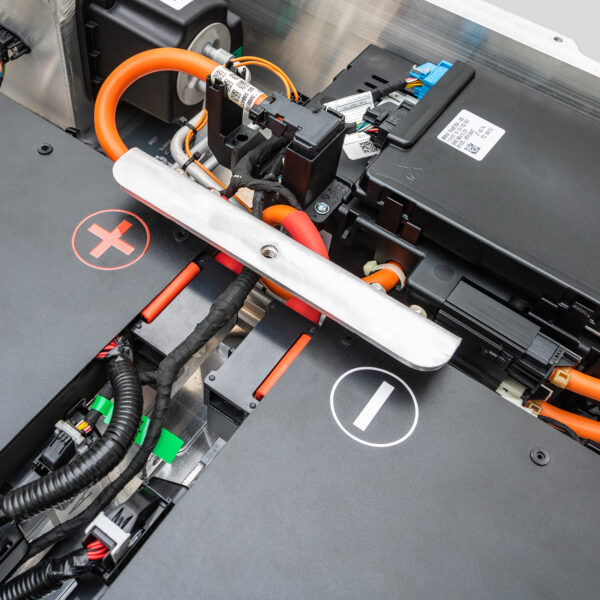
How to Diagnose BMW i3 Battery Communication Errors (Pro) – The “Dead Car” That Isn’t Really Dead
A 2015 BMW i3 is towed into your bay, completely unresponsive. The dashboard is black, the “Ready” light is off, and the scan tool displays a terrifying message: “No Communication with BMS (Battery Management System).” The customer is devastated. “The dealer said the computer is dead and quoted me $5,000 just to diagnose it,” they say. “Is my car bricked? Do I need a new computer, or is the whole battery trash?”
As a professional EV technician in 2026, you know that communication errors are among the most misunderstood faults in the EV world. A “No Comm” code doesn’t always mean the BMS computer has fried. Often, it’s a symptom of a collapsed 12V system, a blown high-voltage fuse due to internal shorts, or a BMS that has shut itself down because the battery cells are critically unstable.
Blindly replacing the SME (Smart Motor Electronics) or the BMS board based on a error code is a recipe for financial disaster. If the root cause is a chemically failed battery pack, a new computer will simply refuse to communicate again immediately upon installation.
Why does the BMS go silent, and is it really a computer failure?
What is the step-by-step protocol to distinguish between a wiring glitch and a dead battery?
And when your diagnostics reveal the BMS shut down to protect a failing pack, how do you pivot from a futile $3,000 computer swap to a high-margin, life-saving battery upgrade?
At CNS BATTERY, we specialize in decoding the silence of failed EVs. We know that true communication restoration comes from stable power and healthy cells, not just swapping circuit boards. This guide details the professional diagnostic workflow for BMW i3 communication errors, exposes the myth of the “bricked computer,” and reveals why replacing the entire system is often the only ethical path forward.
The Silence Breaker: Why the BMS Stops Talking
To fix the problem, you must understand why the BMS goes offline. It rarely dies without a cause.
1. The 12V Auxiliary Collapse
The high-voltage BMS needs the 12V battery to wake up and power its internal logic.
- The Scenario: In aging i3s, the DC-DC converter often fails to charge the 12V, or the 12V battery itself is old. If voltage drops below 9V, the BMS shuts down to prevent corruption.
- The Symptom: Total loss of communication. The car looks dead.
- The Fix: Sometimes, it’s just a $200 12V battery replacement. But you must verify why it died (e.g., did the HV pack fail to charge it?).
2. The Internal HV Fuse Blow
If the battery pack experiences an internal short circuit or massive current spike, the main High Voltage fuse inside the service disconnect blows.
- The Result: The BMS loses its high-voltage reference and safety ground, causing it to sever communication with the rest of the car as a safety measure.
- The Trap: Technicians often blame the BMS. In reality, the fuse blew because the battery cells failed. Replacing the BMS won’t fix a blown fuse caused by bad cells.
3. The “Self-Preservation” Shutdown
When cell deviation becomes critical (>0.5V) or insulation resistance drops to dangerous levels, the BMS may enter a hard lockout mode.
- The Logic: “The battery is unsafe. I will stop talking to prevent any accidental energizing.”
- The Reality: The computer is fine; the battery is toxic. No amount of coding will make a BMS communicate if it detects a lethal internal fault.
Professional Diagnostic Protocol: Waking the Silent Pack
Do not order a replacement computer yet. Follow this rigorous workflow to find the true culprit.
Step 1: The 12V Vital Signs Check
Before touching high voltage, check the auxiliary system.
- Measure Voltage: Check the 12V battery terminals. Is it above 12.4V?
- Load Test: If voltage is low, charge or jump-start the 12V system externally.
- The Test: With stable 12V power, attempt to communicate with the BMS again.
- Success: The BMS was just asleep. Investigate the DC-DC converter and 12V battery health.
- Failure: If 12V is strong but there is still “No Comm,” proceed to Step 2.
Step 2: High Voltage Fuse & Power Integrity
- Safety First: Depower the vehicle, remove the Service Plug (MSD), wait 15 minutes, and verify 0V.
- Inspect the Fuse: Locate the main HV fuse (often integrated into the MSD or junction box). Test for continuity.
- Blown Fuse: This is the smoking gun. Do not replace it yet. A blown fuse indicates a massive short. You must test the battery insulation (Megger test) before installing a new one.
- Intact Fuse: Power is reaching the pack. The issue is likely internal BMS failure or a data bus wiring break.
Step 3: CAN Bus Wiring Verification
- Check Continuity: Measure resistance on the CAN High and CAN Low lines between the BMS connector and the SME/Head Unit.
- Check for Shorts: Ensure neither CAN line is shorted to ground or 12V power. Rodent damage is common in i3s and can sever these critical data lines.
- The Verdict: If wiring is perfect, 12V is strong, and the HV fuse is intact, then suspect the BMS hardware itself.
Step 4: The “Hard Lock” Diagnosis
If the BMS hardware is suspected, check for fault codes in other modules (like the SME).
- Clue: If the SME reports “Battery Insulation Fault” or “Cell Imbalance Critical” before losing communication, the BMS didn’t die; it locked out due to battery failure.
- The Truth: In 80% of “No Comm” cases on older i3s, the BMS is functioning correctly by refusing to operate a dangerous battery.
The Hard Truth: Why Swapping the BMS Fails
If your diagnostics point to a blown HV fuse caused by internal shorts, or a hard lockout due to cell failure, you must deliver the hard news: The computer isn’t the problem; the battery is.
- The Safety Lock: A BMS that locks out due to critical faults cannot be “coded” back to life. It requires the physical parameters (voltage, insulation) to return to safe limits, which is impossible with degraded cells.
- The Recurrence: If you bypass the lock or replace the BMS without fixing the internal short, the new fuse will blow instantly, or the new computer will detect the fault and lock out again within seconds.
- The Cost: A genuine BMW BMS or SME unit costs $2,000–$4,000 plus programming. If it fails again because the battery is bad, you face a furious customer and a massive refund liability.
The Verdict: If the battery is the cause of the communication loss, the entire battery pack must be replaced.
The CNS BATTERY Solution: Restore Communication Permanently
When you explain that the “dead computer” is actually a safety shutdown caused by a dying battery, the customer will fear the dealer’s $20,000+ quote. This is your opportunity to offer the CNS BATTERY High-Capacity Upgrade—the solution that wakes the car up and keeps it running.
Why Upgrading Is the Ultimate Fix
- Instant Wake-Up: Our 120 Ah to 180 Ah upgrades come with brand-new, fully functional BMS units. They communicate perfectly with the vehicle’s CAN bus immediately upon installation.
- No Safety Lockouts: Fresh Grade-A cells have perfect insulation and balanced voltages. The BMS never enters a hard lockout mode. The car starts every time.
- Plug-and-Play: Our systems are designed to mimic OEM communication protocols. No complex coding hacks required. Just install, clear codes, and drive.
- Double the Range: While fixing the communication error, you upgrade the customer from a dead brick to a vehicle with 130–200+ miles of range.
- Cost Efficiency:
- Failed BMS Swap: $3,000+ (wasted money) + Angry Customer.
- Dealership Replacement: $20,000+.
- CNS BATTERY Upgrade: $8,000 – $14,000 USD. You get a brand-new battery with a working BMS and double the range for half the dealer price.
- Warranty Confidence: Backed by our 3–5 Year Warranty, ensuring the communication system remains stable for years.
Real Story: From “Bricked Car” to “Connected Cruiser”
“City EV Diagnostics” had a 2014 i3 come in with total communication loss. The previous shop quoted $4,500 to replace the SME and BMS. The customer was ready to scrap the car.
“Our 12V check was fine, but the HV fuse was blown,” says the lead tech. “We Megger-tested the pack and found 2 kΩ resistance to chassis—a dead short inside. We explained that the BMS wasn’t broken; it had sacrificed itself to stop a fire. We installed a CNS BATTERY 150 Ah upgrade. The moment we connected it, the dashboard lit up, all modules communicated, and the car showed 170 miles of range. The customer saved $10,000 compared to the dealer route and got a better car. We didn’t just fix a code; we saved the vehicle.”
Stop Guessing, Start Connecting
Diagnosing BMW i3 battery communication errors isn’t about throwing parts at a silent car. It’s about understanding why the system went silent in the first place. Don’t sell your customers expensive computers that won’t solve the root cause.
Be the shop that finds the truth. Be the shop that offers the permanent solution: a brand-new battery system that communicates flawlessly and provides reliable range.
Struggling with a “No Comm” error?
Stop guessing and start solving. Contact CNS BATTERY today for a professional diagnostic consultation. Discover how our BMW i3 Series Battery upgrades can eliminate communication failures permanently, providing your customers with a responsive, safe, and long-range driving experience.
👉 Get Your Communication Diagnostic & Upgrade Quote
Frequently Asked Questions (FAQ) for Shops
1. Can a bad 12V battery cause BMS communication errors?
Yes. This is the most common cause. If the 12V system voltage drops too low, the high-voltage BMS cannot power up its logic board, resulting in a “No Communication” error. Always test/charge the 12V battery first.
2. Why does my scan tool say “No Response from BMS”?
This means the BMS is not transmitting data on the CAN bus. Causes include:
- Lost 12V Power: BMS is asleep.
- Blown HV Fuse: BMS has lost safety reference.
- Wiring Break: CAN wires are cut (rodents).
- Hard Lockout: BMS detected a critical battery fault and shut down intentionally.
3. Should I replace the BMS computer if it won’t communicate?
Only after ruling out power and wiring issues. In older i3s, a non-communicating BMS is often a symptom of a failed battery pack (blown fuse or safety lock). Replacing the computer without fixing the battery will result in immediate failure.
4. How do I know if the HV fuse is blown without opening the pack?
You usually need to remove the Service Plug (MSD) to visually inspect or test the fuse continuity. Never do this without proper PPE and depowering procedures. A blown fuse almost always indicates a serious internal battery fault.
5. Will a new battery fix the communication error?
Yes. A CNS BATTERY upgrade includes a brand-new, fully functional BMS. Since the new cells are healthy, the BMS will not enter a safety lockout, and communication will be restored immediately.
6. Is it safe to drive with a communication error?
No. If the BMS is not communicating, the car cannot monitor battery safety (temperature, voltage, isolation). The vehicle will likely remain in a “Not Ready” state and cannot be driven.
7. How much does it cost to fix communication errors?
Diagnosing and replacing a 12V battery or fixing wiring costs $200–$600. Replacing a BMS/SME computer costs $3,000–$5,000 but often fails if the battery is bad. A CNS BATTERY upgrade costs $8,000–$14,000, providing a brand-new battery with a working BMS and double the range, offering the best long-term value.


