
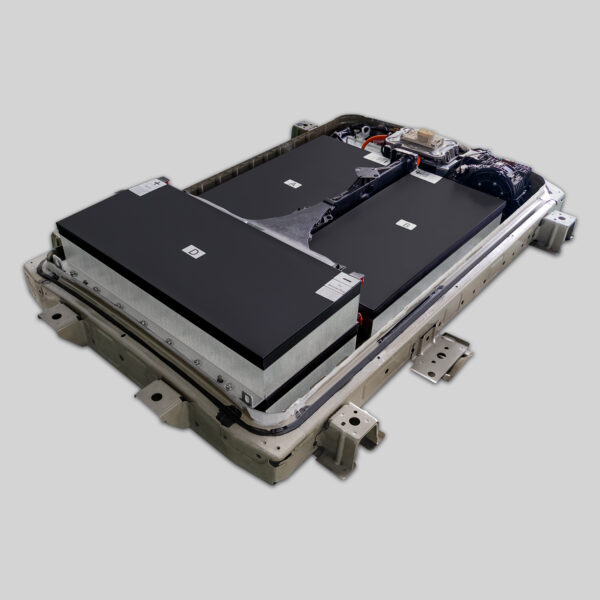
Solving Nissan Leaf BMS Programming Faults Without Going to the Dealer
Is your Nissan Leaf displaying a “BMS Fault” or “Battery Management System Error” warning? You’re not alone. As a professional in the EV battery industry, I see this issue frequently, especially in older Leaf models (ZE0, AZE0, and ZE1) where the battery has degraded significantly or after a battery replacement.
The BMS is the brain of your battery pack. When it malfunctions, your car might limit power, refuse to charge, or display warning lights. Traditionally, drivers felt forced to visit expensive dealerships for reprogramming. However, with the right knowledge and tools, many BMS faults can be resolved independently, saving you hundreds of dollars in service fees.
At CNS BATTERY, we specialize in OEM-compatible Nissan and BMW battery solutions. We understand the technical intricacies of these systems, and we’re here to guide you through fixing these faults without stepping foot in a dealership.
Understanding the BMS and Common Fault Triggers
Before diving into the fix, it’s crucial to understand why the fault occurs. The Battery Management System monitors every cell’s voltage, temperature, and overall health. A “BMS Fault” usually appears due to:
- Severe Battery Degradation: When the State of Health (SOH) drops below a critical threshold (often below 15-20%), the BMS locks the system.
- Voltage Imbalance: If individual cell modules fall out of sync, the BMS triggers a safety fault.
- Replacement/Refit Errors: Installing a new or refurbished pack often requires a “handshake” or reset procedure to communicate the new battery’s parameters to the car’s computer.
If you’re seeing this fault due to an old, degraded battery, the only permanent fix is a battery replacement. However, if it’s a communication error or you’ve just installed a new pack, reprogramming is the key.
Method 1: The “Hard Reset” (Soft Reprogramming)
This is the simplest and least invasive method. It often clears temporary glitches or communication hiccups in the BMS.
- Park Safely: Ensure your car is in “Park” and the parking brake is engaged.
- Turn Off: Switch the car off completely (do not leave it in “Ready” or “ACC” mode).
- Wait: Leave the car untouched for at least 15-20 minutes. This allows the capacitors in the BMS to discharge fully and the system to reset its memory.
- Restart: Turn the car back on.
- Note: If the fault persists, proceed to the next method. Do not attempt to drive the car if the fault warning remains.
Method 2: The “12-Volt Reboot” (Deep System Flush)
If a simple reset doesn’t work, you need to disconnect the primary power source to force the BMS to reinitialize.
- Open the Hood: Locate the 12-volt auxiliary battery.
- Disconnect: Remove the negative (-) terminal clamp.
- Discharge: Press the horn or turn on the headlights for a few seconds to drain residual power (the lights won’t stay on long).
- Wait: Leave the terminal disconnected for a minimum of 2 hours. Some technicians recommend overnight for stubborn faults.
- Reconnect: Secure the negative terminal back and tighten it.
- Test: Get inside, turn the car on, and press the “Start” button while holding the brake. Do not touch the accelerator.
Why this works: This process forces the BMS to perform a full boot sequence. When the car powers back up, it attempts to re-scan the battery modules. If the modules are physically healthy (not swollen or dead), this often clears the “System Fault” light.
When a Hard Reset Isn’t Enough: The Need for a New Battery
If you’ve performed the hard reset and the fault returns immediately, or your Leaf’s range has dropped drastically, it indicates that the hardware (the battery cells) is failing, not just the software.
In these cases, reprogramming alone won’t solve the problem. You need a new, reliable battery pack.
Why Choose a CNS BATTERY Pack?
At CNS BATTERY, we don’t just sell batteries; we provide solutions that are designed to work seamlessly with your Nissan Leaf’s BMS from the moment of installation.
- Brand New CATL Cells: Unlike refurbished packs that might trigger faults due to inconsistent cell health, we use brand new, premium cells.
- OEM Compatibility: Our packs are engineered to meet original factory standards. This means the BMS in our pack communicates perfectly with your Leaf’s onboard computer without requiring complex, dealer-level coding in most cases.
- Plug-and-Play Design: Our battery packs are designed for direct replacement. The connectors match the original factory specifications, minimizing the risk of connection errors that cause BMS faults.
The Professional Solution: Video Call Programming Support
Sometimes, a battery replacement requires specific programming steps, such as updating the Battery Open Circuit Voltage (OCV) or performing a specific diagnostic sequence. While this sounds daunting, you still don’t need a dealer.
CNS BATTERY offers a unique solution: We provide free video call installation and programming guidance.
If you encounter a BMS fault during or after installing one of our premium battery packs, our technical experts are ready to assist you remotely.
- Real-Time Assistance: We guide you through the diagnostic tool connections.
- Expert Guidance: Our engineers walk you through the specific software steps needed to reset the BMS and confirm the new battery’s capacity (e.g., updating from a 24kWh to a 40kWh or 62kWh profile).
- No Dealership Fees: You get the expertise of a factory technician without the exorbitant labor charges.
Conclusion: Solve It Yourself and Save
Dealing with a Nissan Leaf BMS fault doesn’t have to mean a trip to the dealership and a hefty bill. By trying the hard reset methods outlined above, you can often clear temporary glitches for free.
However, if the fault is due to old age or a failing battery pack, the smartest investment is a high-quality replacement. By choosing a CNS BATTERY pack, you get the peace of mind of brand-new technology combined with our direct technical support to ensure your BMS is programmed correctly the first time.
Don’t let a BMS fault keep your Leaf off the road. Explore our range of Nissan Leaf battery solutions and get back to driving with confidence.
Frequently Asked Questions (FAQ)
Q1: Can I permanently fix a BMS fault without replacing the battery?
A: It depends on the root cause. If the fault is due to a software glitch or communication error, the “Hard Reset” or “12-Volt Reboot” methods described above can permanently fix it. However, if the fault is caused by severely degraded or damaged battery cells (modules), the only permanent fix is replacing the physical battery pack. A software reset cannot revive dead lithium-ion chemistry.
Q2: Will installing an aftermarket battery like CNS BATTERY trigger BMS faults?
A: Not if it’s a high-quality, OEM-standard pack. Inferior aftermarket batteries often use mismatched or recycled cells, which cause voltage imbalances and trigger faults. CNS BATTERY packs use brand new, sorted CATL cells and are built to exact OEM specifications. This ensures stable communication with your car’s BMS. Furthermore, our technical support team provides video guidance to ensure the programming is done correctly during installation, preventing compatibility issues.
Q3: Is it safe to reset the BMS myself?
A: Yes, the reset procedures described (Hard Reset and 12-Volt Reboot) are safe and standard practices used by mechanics worldwide. They simply involve cutting power to allow the system to discharge and reset. However, if you smell burning, see smoke, or notice physical damage (swelling) on the battery modules, do not attempt a reset. These are signs of a serious hardware failure, and the vehicle should be towed to a professional.
Q4: How do I know if my BMS needs reprogramming or just a reset?
A: A Reset is a power cycle (like restarting your computer) used to clear temporary errors. Reprogramming involves changing the software data (like updating your computer’s OS) and is usually required when:
- You install a battery with a different capacity (e.g., upgrading from 24kWh to 40kWh).
- The BMS software has become corrupted.
- You are installing a brand new BMS unit.
If your car’s range is fine but the light is on, try a reset. If you just installed a new battery, you likely need reprogramming.
Q5: What is the warranty on a CNS BATTERY if I install it myself?
A: CNS BATTERY offers an industry-leading 2-year / 80,000 km warranty. While we recommend installation by a certified technician to ensure safety and optimal performance, we do support DIY installations. Our free video call support is designed to assist DIYers. As long as the battery is not physically damaged due to improper handling, the warranty remains valid.
Ready to solve your Nissan Leaf battery issues? Contact our technical experts today for a free consultation and quote.

