
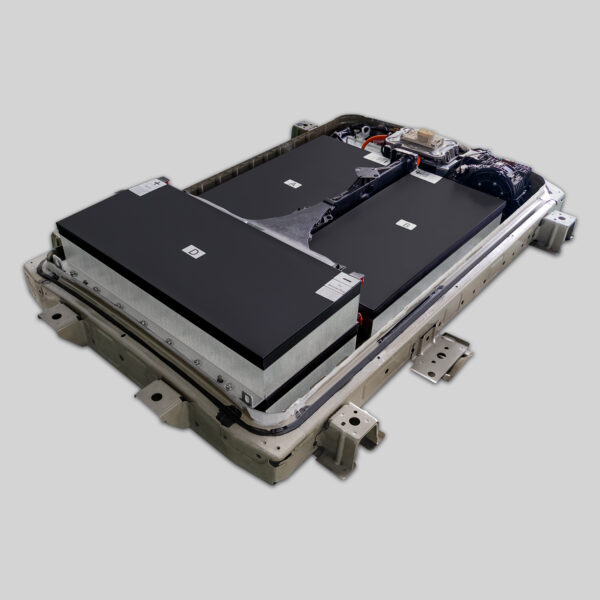
How to Install a New Battery in Your Nissan Leaf Plus
Is your Nissan Leaf Plus (or standard Leaf) range suffering due to battery degradation? If you’re looking to restore your vehicle’s performance without paying the exorbitant price of a dealership replacement, you’re in the right place.
As a leading manufacturer of high-performance EV powertrains, CNS BATTERY specializes in providing OEM-compatible, cost-effective battery solutions for Nissan and BMW models. We understand that replacing the battery is a significant task. That’s why we’ve designed our packs for seamless integration and provide comprehensive support to ensure your installation is a success.
This guide walks you through the entire process of upgrading to a new Nissan Leaf battery pack, specifically focusing on maximizing range and safety. Whether you’re a DIY enthusiast or a professional mechanic, this article will prepare you for the job.
Why Upgrade to a CNS Battery Pack?
Before diving into the installation steps, let’s address the “why.” Many Leaf owners face a dilemma when their battery health drops below 70%: buy a new car or pay thousands for a factory replacement.
CNS BATTERY offers a third option: a brand-new, high-capacity lithium-ion battery pack at less than half the price of OEM.
- Massive Cost Savings: Save over 50% compared to dealership prices.
- Extended Range: Our packs (available in 40kWh, 50kWh, 62kWh, and 68kWh) utilize premium CATL brand-new cells, ensuring your Leaf Plus drives like new again.
- Plug-and-Play Design: Engineered to meet OEM standards, our packs are designed for direct replacement without complex modifications.
🛠️ Pre-Installation: Tools and Safety
Safety is the absolute priority. Lithium-ion batteries store high voltage, which can be dangerous if mishandled.
What You’ll Need
- Personal Protective Equipment (PPE): Insulated rubber gloves and safety goggles.
- Mechanical Tools: A full set of wrenches and sockets (metric), a torque wrench (recommended), and a floor jack with axle stands.
- Electrical Tools: A digital multimeter to check voltage.
- Cleaning Supplies: Terminal cleaner and dielectric grease (often provided in our free toolkit).
- The New Battery: Ensure you have received your CNS Nissan Leaf Battery Pack and verified the compatibility with your VIN.
Safety Protocol
- Disconnect Power: Always disconnect the 12V auxiliary battery first to ensure the vehicle systems are dead.
- No Jewelry: Remove watches and rings to prevent accidental short circuits.
- Work Area: Ensure the area is dry and well-ventilated.
📝 Step-by-Step Installation Guide
Installing a CNS battery typically takes 1-2 hours for a professional technician. Here is the standard procedure based on the Nissan Leaf/ZOE platform.
Step 1: Vehicle Preparation
- Park the vehicle on a flat, level surface.
- Engage the parking brake and chock the wheels.
- Open the hood and disconnect the negative terminal of the 12V battery. This is crucial to cut all vehicle power.
- Remove the rear seats to access the high-voltage interlock loop (HVIL) connector (if applicable to your model year).
Step 2: Accessing the Battery Pack
- Lift the vehicle using a floor jack and secure it with axle stands. Never work under a car supported only by a jack.
- Remove the underbody shield/panels to expose the battery pack mounting bolts.
Step 3: Disconnecting the Old Battery
- Locate the Main Service Disconnect (MSD): This is usually a bright orange handle or connector. Remove it to physically break the high-voltage circuit.
- Disconnect the high-voltage cables (Orange) from the battery pack. Note the positive (+) and negative (-) positions.
- Disconnect the low-voltage (12V) signal harnesses and temperature sensor connectors.
- Remove Mounting Bolts: There are typically 10-12 bolts securing the battery to the chassis. Remove these carefully.
Step 4: Installing the CNS Battery
- Visual Inspection: Before lifting, inspect the new CNS pack for any transit damage.
- Lift and Position: Using a transmission jack or similar support, lift the new battery into position.
- Torque Bolts: Secure the battery to the chassis using the original bolts. Important: Tighten these to the manufacturer’s specified torque settings to avoid stripping threads.
- Reconnect Harnesses: Reconnect all the low-voltage signal wires and temperature sensors first.
- Reconnect High Voltage: Reattach the main positive and negative cables. Apply dielectric grease to the terminals to prevent corrosion.
Step 5: System Integration and BMS Programming
This is where CNS BATTERY’s expertise shines. Our packs come pre-programmed, but often require a “handshake” with the vehicle.
- Reinstall the MSD: Plug the main service disconnect back in.
- Reconnect 12V: Reconnect the negative terminal in the engine bay.
- BMS Calibration: Turn the ignition on (do not start the car). The Battery Management System (BMS) may need to initialize. This usually takes 5-10 minutes. If the dashboard shows errors, our support team offers remote video guidance to assist with the programming reset.
💡 Pro Tips from CNS Experts
- The “Plug-and-Play” Reality: While our packs are designed to be plug-and-play, some 2018+ models may require a simple software handshake. Don’t panic if the car doesn’t start immediately; this is normal during the BMS synchronization phase.
- First Charge: We recommend charging the new battery to 100% immediately after installation to help the BMS accurately calculate the State of Charge (SOC).
- Winter Precautions: If installing in cold weather (below 0°C), allow the battery to warm up to at least 5°C before driving or fast charging to protect cell longevity.
🤔 Frequently Asked Questions (FAQ)
Q1: How much does a replacement Nissan Leaf Plus battery cost?
A: At CNS BATTERY, we offer significant savings. While dealership replacements can cost upwards of $16,000 USD, our high-quality, brand-new CATL cell packs start at a fraction of that price. For an exact quote based on your model year and desired capacity (40kWh to 68kWh), please contact us directly.
Q2: Can I install the battery myself?
A: Yes. Many of our customers are DIY enthusiasts. The process is mechanical (bolts and bolts) and electrical (plugging connectors). However, due to the high voltage, we strongly recommend having experience with EV systems or working with a qualified mechanic. We provide detailed installation videos and manuals to guide you.
Q3: What is the warranty on the new battery?
A: We stand by our quality. All CNS Automotive Batteries come with a minimum 2-year / 80,000 km warranty (whichever comes first). This covers defects in materials and workmanship, and we guarantee the battery maintains at least 70% capacity during this period.
Q4: Will this void my car’s warranty?
A: Before purchasing, we perform a free VIN compatibility check. Our batteries are designed to OEM specifications, ensuring they do not interfere with other vehicle systems. However, we recommend consulting your specific vehicle warranty terms regarding aftermarket parts.
Ready to Restore Your Range?
Don’t let battery degradation limit your adventures. With CNS BATTERY, you get a brand-new, high-capacity lithium-ion pack backed by industry-leading support and a robust warranty.
Simple steps to get started:
- Select your vehicle model;
- Enter your specifications preferences;
- Submit to receive personalized recommendations.
Get Your Free Custom Quote Now
Let CNS BATTERY put your mind at ease with reliable power innovation.


